
Productivity software has changed more in 2026 than in the previous few years combined. The main shift is simple: tools that used to store your tasks now try to do parts of the work for you.
This guide covers the most important productivity tools updates 2026 has produced so far, from Notion and Google Workspace to Microsoft 365, ClickUp, Asana, Slack, AI schedulers and note apps. You will get dates, plain-English explanations, and a way to decide which updates deserve your attention.
What Are the Latest Productivity Tool Updates in 2026?
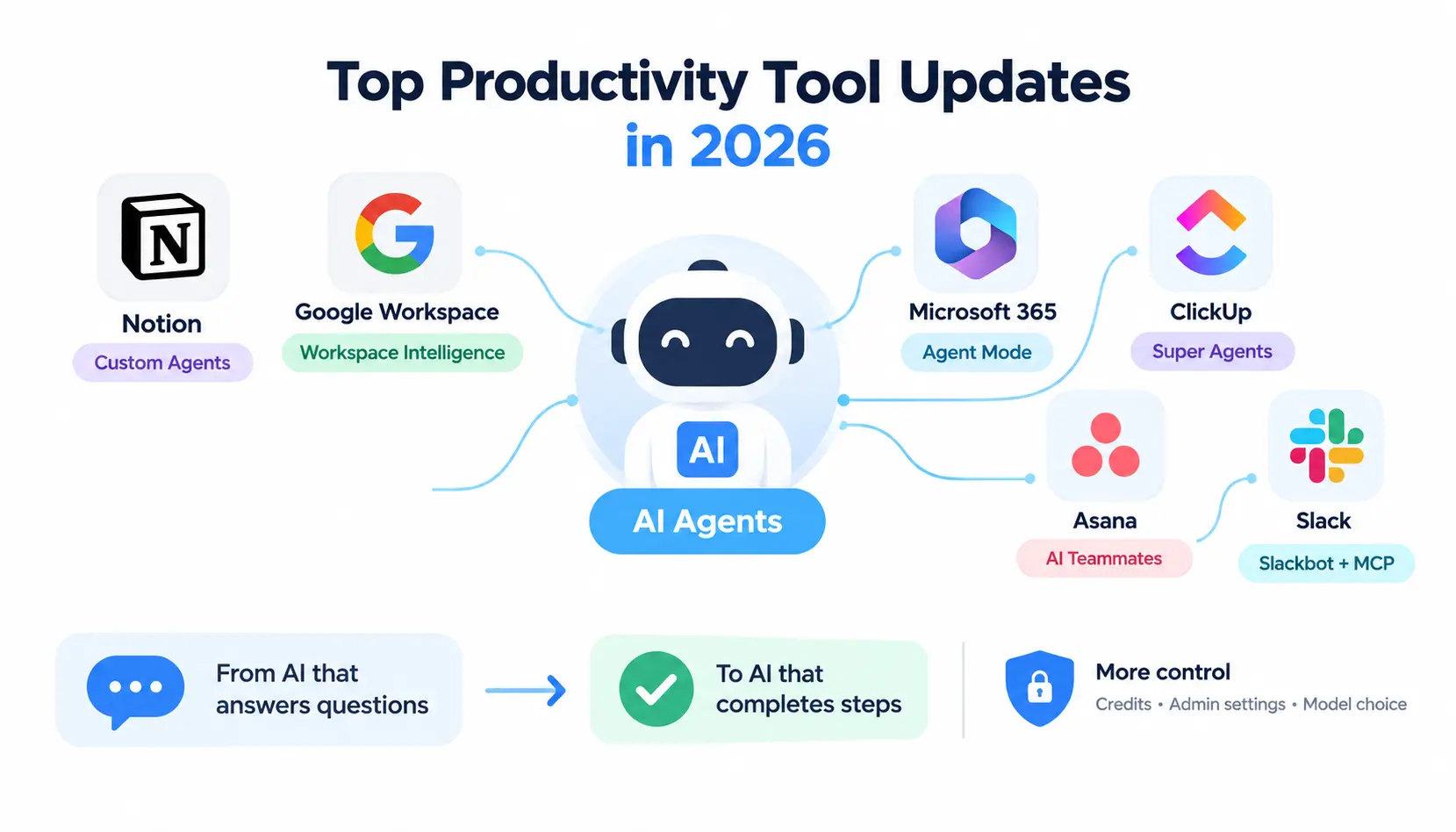
The biggest productivity tool updates in 2026 are AI agents that act inside your workspace, not just chat with you. Notion launched Custom Agents, Google introduced Workspace Intelligence, Microsoft made Agent Mode central in Word, Excel and PowerPoint, and ClickUp, Asana and Slack all added agent-style teammates.
In short, the field moved from “AI that answers questions” to “AI that completes steps.” Most vendors also tightened controls, such as credits, admin settings and model choice, because agents cost money and touch company data.
The biggest changes so far
- AI agents: Notion Custom Agents, ClickUp Super Agents, Asana AI Teammates and Slackbot all work on tasks instead of only answering prompts.
- AI scheduling: Motion and Reclaim keep rebuilding calendars when plans change, and Todoist added AI task help.
- Cross-app workflows: Google’s Workspace Intelligence and Microsoft’s Copilot app pull context from many apps at once.
- AI meeting assistance: Notion, ClickUp and Evernote all record, transcribe and summarize meetings. Notion now lets notes trigger an agent.
- Workspace intelligence: Google describes a shared layer that links files, email, chat and projects.
- Smarter search: Slack added email results to enterprise search, Evernote shipped semantic search, and Google added AI Overviews in Drive.
- Automation: Slack, Asana and Notion expanded no-code and agent-based automation.
- Better integrations: MCP-style connections and AI connectors let tools talk to Claude, ChatGPT, Gemini and others.
Quick 2026 update summary
| Tool | Major Update | Date | Category | Availability |
| Evernote | Version 11: AI Assistant, Semantic Search, AI Meeting Notes | Rollout from Jan 19, 2026 | Notes | All users; AI Assistant on desktop and web at launch |
| Microsoft 365 Copilot | Word, Excel and PowerPoint agents | Feb 2026 (Frontier program) | Documents | Copilot-licensed users, preview program |
| Notion | Custom Agents (Notion 3.3) | Feb 24, 2026 | Workspace / agents | Credit-based after a free trial period |
| Google Workspace | Gemini in Docs, Sheets, Slides, Drive | Mar 10, 2026 (beta) | Documents / AI | Google AI Pro, Ultra and Gemini Alpha business users first |
| Google Workspace | Workspace Intelligence | Apr 22, 2026 | Cross-app AI | Rolling out with admin controls |
| Microsoft 365 | Agent Mode as default Copilot experience in Word, Excel, PowerPoint | Apr 22, 2026 | Documents / agents | Copilot, Premium, Personal and Family plans (per third-party reports) |
| Asana | Spring 2026 Release: AI Teammates, AI Studio, AI Connectors | May 20, 2026 | Project management | Varies by plan |
| ClickUp | Brain2 and Brain MAX app | Jun 2026 | Project management / AI | Check plan and AI add-on |
| Slack | Slackbot memory, voice dictation, MCP, native charts | Jun 2026 | Communication | Mostly paid plans |
| Notion | Notion 3.7: shared skills library, sub-agents | Sep 2026 | Workspace / agents | Check plan |
Productivity Tools Updates 2026: Month-by-Month Timeline
This timeline lists the changes I could confirm from vendor release pages or press coverage. It is a living section, and October onward is intentionally left open.
January 2026
- Evernote began rolling out version 11 on January 19, adding an AI Assistant, Semantic Search and AI Meeting Notes, according to its launch announcement.
- Slack made its rebuilt, personal Slackbot available in late January, according to Slack’s release page.
- ClickUp introduced a higher “Everything AI” pricing tier, per ClickUp’s own changelog.
February 2026
- Microsoft began rolling out Word, Excel and PowerPoint agents in Copilot Chat on February 9, through the Frontier program (message center MC1187799).
- Notion shipped version 3.3 on February 24 with Custom Agents.
- Obsidian released Web Clipper 1.0 with template logic and version 1.12 with a command-line interface and Bases search (Obsidian changelog).
- ClickUp added Super Agents, AI teammates that work across tasks, Docs and schedules.
March 2026
- Google announced Gemini upgrades for Docs, Sheets, Slides and Drive on March 10, starting in beta.
- Notion released 3.4 with custom skills, dashboards and a reorganized sidebar.
- Microsoft announced Copilot “Wave 3,” which includes Copilot Cowork for longer, multi-step tasks.
- Slack connected Gmail and Outlook to enterprise search on March 30.
- ClickUp made migration to ClickUp 4.0 mandatory.
April 2026
- Google introduced Workspace Intelligence on April 22 at Cloud Next.
- Microsoft moved Agent Mode into general availability across Word, Excel and PowerPoint, also on April 22, according to third-party coverage of Microsoft’s announcement.
- Slack added Slackbot skills.
- Notion added more agent integrations and AI Autofill for databases.
May 2026
- Microsoft launched Microsoft 365 E7 and Agent 365 on May 1, as reported by partner coverage.
- ClickUp brought Brain to mobile and connected to ChatGPT and Cursor.
- Notion started charging for Custom Agents through credits on May 4.
- Asana published its Spring 2026 Release on May 20.
- Slack let admins allow Slackbot to search the web.
June 2026
- ClickUp launched Brain2 and the Brain MAX app.
- Slack added Slackbot memory, voice dictation, charts and an MCP option.
- Obsidian updated Web Clipper to 1.7.0 on June 16, with better highlight handling.
July 2026
- Slack merged navigation and search into a search-first Cmd+K experience, and let you convert an AI-agent DM into a private channel.
- Notion added Workers to its credits dashboard (July 24) and let AI Meeting Notes trigger Custom Agents (July 31).
- Evernote improved how its AI Assistant handles search (July 15).
August 2026
- Slack let AI agents read, write and manage Slack Lists.
- Notion shipped further agent updates in mid and late August.
September 2026
- Notion released 3.7: a shared skills library, Custom Agents that call other Custom Agents, and a post-meeting recap agent, per Notion’s release notes.
October–December 2026
Nothing confirmed yet. This section will be updated as new releases ship.
Major Productivity Tool Updates in 2026
Notion Updates
Notion changed the most of any note-and-docs tool this year. It now treats AI less like a sidebar and more like a team member you can set up and manage. You can see the full list on Notion’s release page and in its Wikipedia entry for background on the company.
What changed?
- Custom Agents (February): You build an agent with its own instructions, then let it run on a schedule or trigger. Notion’s release notes say teams were building them quickly.
- Skills (March to September): A skill saves a task you ask for often, such as turning raw notes into a product requirements doc. In September, Notion added a shared skills library and said skills can be taken to other agents like Claude or Codex.
- AI Meeting Notes: You can customize the summary, and as of July, a finished note can trigger a Custom Agent. In September, an agent can pick up post-meeting work automatically.
- Sub-agents: One Custom Agent can now call another, each with its own instructions, access and model.
- Model controls and costs: Notion added more model options and said some use far fewer credits. A summary of its April release notes put the cost drop at 35% to 50%, but treat that figure as vendor-reported.
- Calendar and integrations: Agents can connect to Calendar, Mail and Slack, with Microsoft Teams, Google Drive and Salesforce listed as coming.
- Workers: These now show up in the credits dashboard, which tells you Notion is tracking their usage like any other agent cost.
- Automation: AI Autofill in databases fills and updates fields using Custom Agents.
Who benefits?
Teams that already keep wikis, meeting notes and project databases in Notion get the most. A small marketing team, for example, can store its brief template as a skill and have an agent draft a first brief after every kickoff call.
Solo users get less. If you only use Notion for personal notes, agents may cost more than they save.
Which plans include it?
Notion’s March release said custom skills were available on Business and Enterprise plans. Custom Agents were free to try until May 3 and use purchasable Notion Credits from May 4. Plan details change, so check the pricing page before you plan a rollout.
Should existing users change their workflow?
Not all at once. Pick one repeated job, such as weekly status summaries, and build one agent for it. Watch the credits dashboard for two weeks. If the agent saves time and the cost is reasonable, add a second.
Google Workspace Updates
Google’s 2026 story has two parts. In March, Gemini got deeper inside Docs, Sheets, Slides and Drive. In April, Google introduced a layer meant to connect them. Background on the suite is on Wikipedia.
What changed?
- March 10 (beta): Docs gained “Help me create,” which drafts from your Drive files, Gmail and Chat. Sheets can build and edit spreadsheets from plain-language prompts. Google said the first wave was for Google AI Pro and Ultra subscribers and Gemini Alpha business customers, in English. Drive’s version started in the U.S.
- April 22: Workspace Intelligence arrived. Google describes it as a unified layer that understands files, email, chats, projects and relationships across the suite.
- Ask Gemini in Chat: Google calls it a command line for work. Press coverage says it can brief you on your day, find files from a description, and coordinate with tools such as Jira, Asana and Salesforce.
- Gmail: Press coverage describes an AI-prioritized inbox and AI search summaries.
- Drive: AI Overviews and Ask Gemini in Drive became generally available, and Drive Projects groups files and emails around one piece of work.
I could not confirm a separate 2026 update for Google Meet or Slides beyond the March Gemini work, so I have left them out rather than guess.
Practical workflow examples
- Weekly report: Ask Gemini in Docs to draft a client update from last week’s meeting notes and email thread, then edit it yourself.
- Budget cleanup: Describe the sheet you need and let Gemini build the first version, then check every formula.
- Project catch-up: Put files and emails for a launch into one Drive Project, then ask for a status summary.
Availability and plan considerations
Many of these features began in beta and on specific plans. Google said Workspace Intelligence will roll out with admin controls and runs on the same security infrastructure as the rest of Workspace. Admins should review those controls before turning anything on.
Microsoft 365 and Copilot Updates
Microsoft focused on putting agents inside the apps people already use. See its Microsoft 365 blog for official posts and Wikipedia for background.
- Word, Excel and PowerPoint agents (February): These started in Copilot Chat through the Frontier program. Microsoft’s message center describes the Excel agent as handling analysis, formulas and trend spotting, and the PowerPoint agent as building decks from outlines or documents.
- Agent Mode (April 22): Third-party coverage reports it became the default Copilot experience in Word, Excel and PowerPoint, and that it works on files saved in OneDrive or SharePoint. The same coverage lists Microsoft 365 Copilot, Premium, Personal and Family as eligible plans.
- Copilot Cowork (March onward): Microsoft describes it as an execution layer for longer, multi-step work. It first appeared in the Frontier program.
- Copilot app: A Microsoft conference deck from June describes it as a command center with custom instructions, memory, Notebooks, Pages, Researcher and Analyst, where you can start work and then continue in Word, Excel, PowerPoint, Outlook or Teams.
- Outlook: Partner coverage says Agent Mode can also work in Outlook.
- Agent 365 and E7 (May): These target IT teams that need to govern agents.
I did not find a verified, dated 2026 update specific to Planner, so I am not claiming one.
ClickUp Updates
ClickUp 4.0
ClickUp 4.0 launched in late 2025 and became mandatory in March 2026. It puts tasks, Docs, Chat and AI in one sidebar. ClickUp’s 4.0 changelog lists scheduled chat messages, saved messages and a full-page AI Hub.
AI and Brain
Super Agents arrived in early 2026 as AI teammates that work across tasks, Docs and schedules, with audit logs. In June, ClickUp launched Brain2 and a standalone Brain MAX app. Brain also reached the mobile app in May.
Workspace changes
The converged sidebar replaced the 3.0 layout. The tradeoff is learning time: moving everyone to a new layout is a real cost for a large team.
Planner and task improvements
Planner is one of the pinnable sidebar items. A third-party guide also shows calendar views with focus blocks and an AI notetaker.
Integrations
ClickUp added a Gmail connection for Brain, Google Drive automations, a ChatGPT integration and a Cursor integration, per its release notes.
Who benefits?
Teams that want one place for tasks, docs and chat, and are willing to pay for AI on top. Watch the add-ons: ClickUp’s changelog describes separate Brain and “Everything AI” tiers, and some users on r/ClickUp have complained about pricing and seat changes, so read billing terms carefully.
Asana Updates
Asana’s Spring 2026 Release, published May 20, centers on team-level AI. Company background is on Wikipedia and LinkedIn.
AI features
AI Teammates are shared agents built into team workflows. You can pick prebuilt ones from a gallery or build your own without code. Asana says you can audit what they do and which sources they use.
Workflow automation
AI Studio handles routine setup work and project creation.
Project intelligence
Asana highlights risk flagging and status monitoring. Earlier in the year, reviews of its releases also mentioned risk reports and multilingual semantic search.
Integrations
AI Connectors let you start Asana projects and assign work from conversations in Claude, ChatGPT and Gemini.
Slack Updates
Slack rebuilt Slackbot as a personal AI agent this year. Its release page and changelog are the best sources. Background is on Wikipedia.
AI search
Slack connected Gmail and Outlook to enterprise search in March. In July, Cmd+K became a search-first tool that combines navigation and search.
Summaries
Built-in AI summaries, recaps and cited search answers exist, though one June review noted that Slack itself warns Slackbot can make mistakes. Always check summaries on anything important.
Automation
Slackbot skills and Slack actions arrived in April. In August, AI agents gained access to Slack Lists.
Integrations
Slack added an MCP server that lets assistants like Claude and ChatGPT use Slack search, messaging and canvases. Slackbot also got its own MCP feature in June.
Collaboration improvements
You can turn a direct message with an AI agent into a private channel, and Slack added Slackbot analytics for admins.
Todoist, Motion, Reclaim and Sunsama Updates
This group splits into two camps. Motion and Reclaim plan for you. Sunsama and Todoist help you plan for yourself.
- Motion: Automatic scheduling that reshuffles tasks when meetings change. It is the most hands-off option.
- Reclaim: Protects focus time and habits around your existing calendar and syncs with tools like Asana, Todoist, ClickUp, Jira and Linear. Coverage also mentions Reclaim 2.0 added an AI assistant and scheduling agents.
- Sunsama: A guided daily planning ritual. One review noted Sunsama raised prices in 2026 for the first time in five years.
- Todoist: A third-party review lists Assist, voice capture through Ramble, and Email Assist as its 2026 AI features, with AI behind paid plans.
Prices vary widely between reviews, so confirm them on each vendor’s site. A useful rule: pick auto-scheduling if you hate planning, and pick a guided planner if you like control. Reviews also report that Clockwise shut down in March 2026 after joining Salesforce, so check before building around it.
Obsidian and Evernote Updates
Obsidian focused on power users. Version 1.12 added a command-line interface and Bases search, and Web Clipper 1.0 added template logic for turning web pages into Markdown. Your notes stay as local files, which is a data-ownership advantage. See its changelog, community on r/ObsidianMD, and Wikipedia page.
Evernote took the opposite route. Version 11 added a conversational AI Assistant, Semantic Search and AI Meeting Notes. Individual AI features can be switched off in settings. Background is on Wikipedia.
The Biggest Productivity Software Trends in 2026
AI Agents Are Moving Beyond Chat
Think of it as four steps:
- Chatbot: answers a question.
- Assistant: helps with a task you start.
- Copilot: works beside you in the document you have open.
- Agent: takes a goal, performs several steps, and reports back.
Most 2026 launches sit between steps 3 and 4. For a general definition, see Wikipedia’s page on intelligent agents.
AI-Native Scheduling Is Growing
AI schedulers read your calendar, place tasks into open slots, protect focus time, and reshuffle when a meeting moves. The gain is less manual replanning. The risk is losing control of your day, which is why some people still prefer manual planners.
Productivity Tools Are Becoming Work Operating Systems
Tasks, Docs, chat, calendar, AI and automation are merging. ClickUp 4.0 is the clearest example, and Notion, Google and Microsoft are pushing the same direction. For users, that means fewer apps but heavier lock-in.
Cross-App Automation Is Becoming More Important
Work rarely lives in one tool. Asana’s AI Connectors, Slack’s MCP server and Google’s Ask Gemini in Chat all try to connect separate systems. The Model Context Protocol is one standard that several of these integrations build on.
Integration Depth Matters More Than Feature Count
A simple tool that plugs cleanly into your calendar, chat and files can beat a feature-packed one that sits alone. Ask whether the connection moves real data both ways, or only sends a notification.
AI Productivity Tools vs. Traditional Productivity Tools
| Feature | Traditional Tools | AI-Powered Tools |
| Task creation | Manual | AI-assisted |
| Scheduling | Manual | Automated |
| Summaries | Manual | AI-generated |
| Search | Keyword-based | Semantic and contextual |
| Automation | Rules | Rules plus agents |
| Reporting | Manual dashboards | AI-generated insights |
AI versions are faster at the first draft. They still need human review, especially for summaries and numbers.
Productivity Tools by Use Case
Best Categories for Personal Productivity
Start with task management, calendar planning and note-taking. Add focus and habit tools only if you will use them. For community opinions, r/productivity is a useful place to see how real users compare apps.
Productivity Tools for Remote Teams
Look for shared docs, project boards, chat, and async options such as recorded meeting notes. Notion, ClickUp, Asana and Slack all cover parts of this.
Productivity Tools for Developers
Prioritize coding agents, issue tracking, documentation and automation. ClickUp’s Cursor integration and Slack’s agent-building tools are 2026 examples.
Productivity Tools for Marketers
Content drafting, research, project tracking, reporting and automation matter most. Google Docs with Gemini and Notion Custom Agents suit briefs and content calendars.
Productivity Tools for Managers
Managers need planning, meeting summaries, status reporting and team coordination. Asana’s risk reporting, Slack recaps and Copilot’s Excel and Word agents fit here.
Free vs. Paid Productivity Tools in 2026
What free plans usually include
Core tasks, notes or messaging, with limits on storage, history or advanced features. Slack, for example, has no ongoing AI on its free plan, according to a June review.
What paid plans add
AI features, admin controls, larger storage, advanced integrations and analytics.
When upgrading makes sense
Upgrade when one specific paid feature removes a regular, measurable chore. Do not upgrade because a vendor announced something exciting.
Hidden costs to consider
- Training: Teams need time to learn new layouts and agents.
- Migration: Moving data takes hours that nobody budgets for.
- Integrations: Some connectors cost extra or need higher plans.
- Usage limits: Many AI features cap use.
- AI credits: Notion’s credits and Motion’s monthly credit allowance show that AI can be metered.
- Switching costs: The more automations you build, the harder it is to leave.
How to Evaluate a Productivity Tool Update
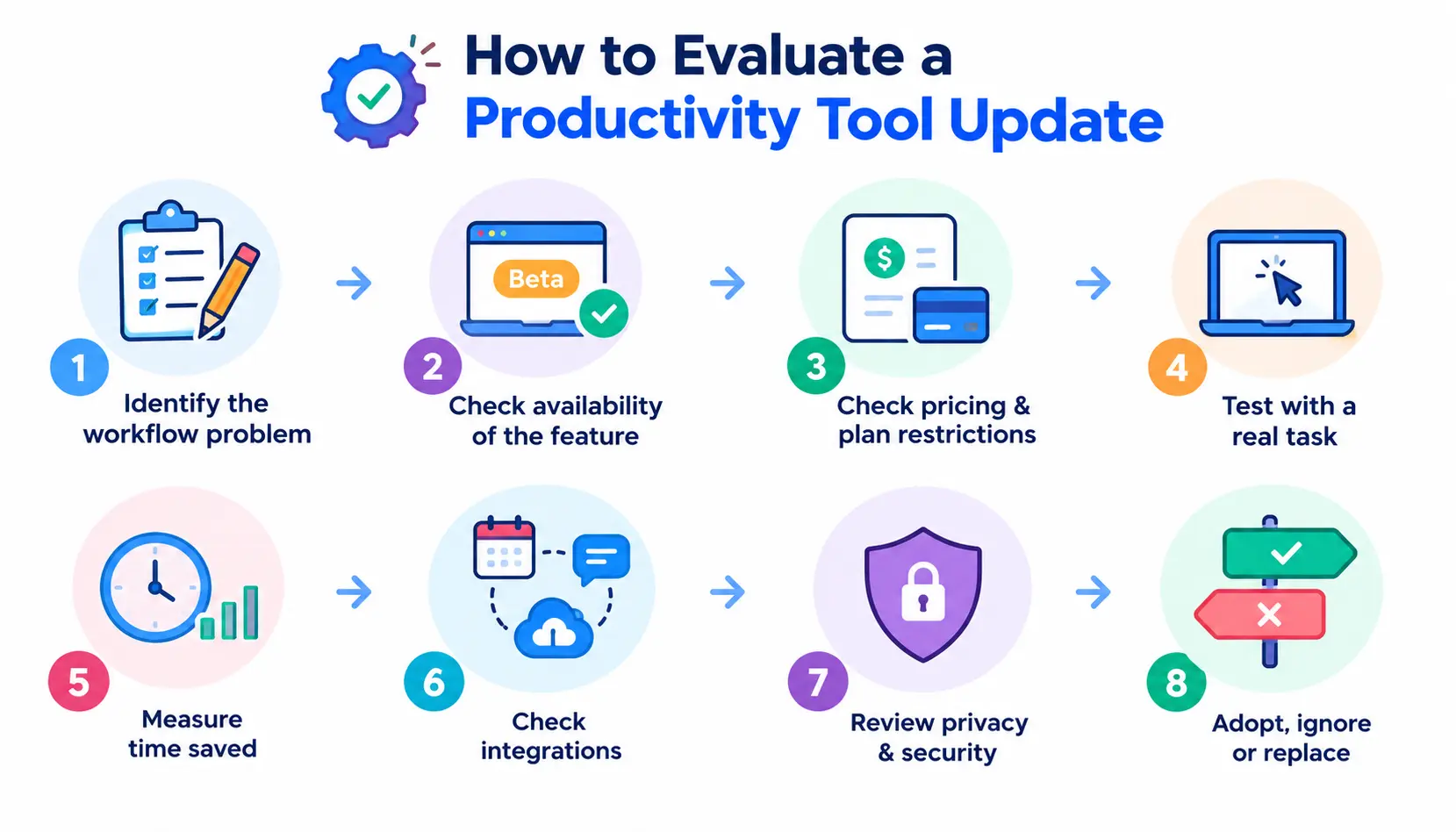
1. Identify the actual workflow problem
Write down the chore you want to remove, such as “I rewrite the same status update every Friday.”
2. Check whether the feature is generally available
Beta, preview and Frontier-style programs may change or limit access.
3. Check pricing and plan restrictions
Check your exact plan, region and language. Several Google features began in English only.
4. Test the feature using a real task
Demos are clean. Your messy files are the real test.
5. Measure time saved
Time the task before and after. If you cannot measure a gain, you probably do not have one.
6. Check integrations
Confirm it connects to the calendar, chat and file systems you use today.
7. Review privacy and security
Check what data the AI can read, where it is processed, and what admins can control.
8. Decide whether to adopt, ignore, or replace
Most updates deserve “ignore for now.” Adopt only the ones that clear steps 1 to 7.
Productivity Tool Update Comparison for 2026
| Tool | AI | Agents | Automation | Scheduling | Collaboration | Integrations | Free Plan | Major 2026 Change |
| Notion | Notion AI, Meeting Notes | Custom Agents, sub-agents | Autofill, skills | Calendar | Strong | Calendar, Mail, Slack; more planned | Yes | Custom Agents and shared skills library |
| Google Workspace | Gemini | Agentic work via Workspace Intelligence | Growing | Google Calendar | Strong | Jira, Asana, Salesforce (reported) | Free personal account; Workspace is paid | Workspace Intelligence |
| Microsoft 365 | Copilot | Agent Mode, Cowork | Copilot Studio, Agent 365 | Outlook | Strong | Deep in Microsoft stack | Limited free web apps | Agent Mode in Word, Excel, PowerPoint |
| ClickUp | Brain, Brain2 | Super Agents | Yes | Calendar, Planner | Strong | Gmail, Drive, ChatGPT, Cursor | Yes | Mandatory 4.0 and Brain2 |
| Asana | AI Studio | AI Teammates | AI Studio | Timeline views | Strong | Claude, ChatGPT, Gemini connectors | Yes (limited) | Spring Release and AI Connectors |
| Slack | Slackbot | Third-party agents, Slackbot | Workflows | Calendar-aware booking | Core strength | MCP, Gmail, Outlook, Salesforce | Yes, no ongoing AI | Slackbot memory and MCP |
| Motion | Yes | Auto-scheduling | Yes | Automatic | Team features | Calendar-focused | No (per reviews) | Hands-off scheduling |
| Reclaim | Yes | Scheduling agents | Habits, focus time | Automatic | Team scheduling | Asana, Todoist, ClickUp, Jira, Linear | Yes (reported) | Reclaim 2.0 |
| Todoist | Assist, Ramble | Limited | Basic | Light | Small teams | Yes | AI task help | |
| Obsidian | Via plugins | Via plugins | CLI | No | Limited | Web Clipper, Sync | Yes for personal use | CLI, Bases, Web Clipper 1.0 |
| Evernote | AI Assistant | No | Limited | Calendar link in paid plan | Limited | Google Calendar, Slack | Yes (limited) | Version 11 AI search |
Free-plan and scheduling cells are summaries from vendor pages and reviews. Confirm before you buy.
Which 2026 Productivity Updates Actually Matter?
Updates that reduce manual work
Asana AI Studio, Notion AI Autofill, Microsoft Agent Mode in Excel, and Slack’s Salesforce-linked actions.
Updates that reduce app switching
ClickUp 4.0, Google’s Ask Gemini in Chat, and the Microsoft 365 Copilot app.
Updates that improve planning
Motion and Reclaim scheduling, Asana risk reporting, and Drive Projects.
Updates that improve collaboration
Shared skills in Notion, Slack agent DMs that convert into channels, and Asana’s team-focused AI Teammates.
Updates that improve knowledge retrieval
Evernote Semantic Search, Slack enterprise search with email, and Drive AI Overviews.
Updates that introduce autonomous workflows
Notion sub-agents, ClickUp Super Agents, Copilot Cowork and Meeting Notes that trigger agents. Start small and keep a human checkpoint.
How Productivity Tools May Change Through the Rest of 2026
These are directions already visible in vendor roadmaps and recent releases, not forecasts.
More agentic workflows
Vendors keep extending agents: Microsoft said Agent Mode would reach more apps later in 2026, and Notion keeps adding agent features.
Deeper cross-app integrations
Notion lists Teams, Google Drive and Salesforce as coming integrations.
AI-managed calendars
Scheduling agents are spreading from standalone apps into suites and task managers.
More contextual workplace search
Slack, Google and Evernote are all investing in semantic and cross-source search.
Greater emphasis on governance and model controls
Credits dashboards, admin controls, audit logs and Agent 365 show vendors responding to cost and security worries.
More automation inside existing productivity platforms
Expect more built-in agents rather than separate AI apps.
Frequently Asked Questions About Productivity Tools Updates 2026
1. What are the latest productivity tool updates in 2026?
AI agents are the headline: Notion Custom Agents, Google Workspace Intelligence, Microsoft Agent Mode, ClickUp Super Agents and Brain2, Asana AI Teammates, and Slackbot with memory and MCP. Notion’s September 3.7 release added a shared skills library and sub-agents.
2. What is new in productivity apps in 2026?
Beyond agents, apps added semantic search, AI meeting notes, auto-scheduling, cross-app context and tighter admin and credit controls.
3. Which productivity tools added AI agents in 2026?
Notion, ClickUp, Asana, Slack, Microsoft 365 and Google Workspace all did. Motion and Reclaim offer scheduling-focused agents.
4. What is the biggest productivity software trend in 2026?
The shift from chat-style AI to agents that perform multi-step work inside the tools you already use.
5. Are AI productivity tools worth using?
Often, for repeated, low-risk chores like summaries, drafts and scheduling. Test on a real task, measure time saved, and review outputs before sharing them.
6. Which productivity tools are free in 2026?
Notion, ClickUp, Asana, Slack, Todoist, Evernote and Reclaim have free or limited plans, and Obsidian is free for personal use. Motion and Sunsama do not have ongoing free plans, based on recent reviews. AI features are often limited to paid plans.
7. What changed in Notion in 2026?
Notion added Custom Agents in February, skills in March, credit-based agent pricing from May 4, Workers in the credits dashboard and meeting-note triggers in July, and a shared skills library plus sub-agents in September.
8. What changed in ClickUp in 2026?
ClickUp 4.0 became mandatory in March, Super Agents arrived early in the year, and Brain2 plus the Brain MAX app launched in June.
9. What are the latest Google Workspace productivity updates?
Gemini upgrades for Docs, Sheets, Slides and Drive started in beta on March 10, and Workspace Intelligence launched on April 22 with Ask Gemini in Chat, Drive Projects and generally available Drive AI Overviews.
10. What is new in Microsoft 365 Copilot?
Word, Excel and PowerPoint agents, Agent Mode as the default experience from April, Copilot Cowork for long tasks, a redesigned Copilot app and Agent 365 for governance.
11. Should I switch productivity tools because of a 2026 update?
Usually not. Switch only if one update clearly removes a recurring problem, the plan fits your budget, and the migration cost is lower than the time you will save.
Conclusion
The productivity tools update 2026 has delivered points in one direction: more work done by software, with more controls around it. That is useful, but only if you pick updates on purpose.
Choose one painful, repeated task. Test one feature on it. Measure the result, then decide. That habit will serve you better than chasing every launch.
Sources include vendor release notes (Notion, Google Workspace, Microsoft, ClickUp, Asana, Slack, Obsidian, Evernote), press coverage of the March and April launches, and third-party reviews for pricing and plan details. Community discussion links point to Reddit forums. This article will be updated as new releases are confirmed

Mehreen Mushtaq is a skilled content writer dedicated to creating high-quality, engaging, and SEO-focused blogs. She specializes in strategic keyword usage, search intent, and informative content that connects with readers while helping websites strengthen their visibility and rankings in search results.