
Most advice, about avoiding distractions while working begins with the line: turn off your phone. The advice is not wrong. It is incomplete. Your phone is one source of interruption. Other sources of interruption are the inbox, coworkers, personal thoughts and sometimes the to‑do list.
This guide takes an approach. Then providing another 20‑item checklist it walks through a system: first figure out what truly pulls attention then remove what can be removed next safeguard the remaining time and finally deal with the interruptions that cannot be avoided. By the end a routine will be ready to use tomorrow morning, not a pile of tips to skim and forget.
How to Avoid Distractions While Working
1. Identify your biggest distractions first

Before you make any changes take one day to just observe. Every time your focus moves away, write down what took your attention when it happened, how you were distracted and if it came from outside or from your own thoughts.
Most people are shocked by what they discover. It is usually not the thing they expected. You may believe Slack is your issue but the check could reveal it is actually your own habit of opening a new tab whenever a task becomes even a little boring.
2. Choose one priority before you start working
Vague tasks are easy to stop doing. “Work on the marketing report” lets your brain start thinking about things because there is no clear end. “Write the summary for the report” does not.
Before you start, decide what one thing has to get done during this time. All other things can be handled later.
3. Put your phone out of reach
A phone lying face-down on your desk still manages to grab your attention even if the screen stays dark. A study from the University of Texas in 2017 showed that just having a smartphone nearby can lower your brainpower even when you’re not using it.
Move it to another room, put it in a drawer or stick it in a bag. Turn on Do Not Disturb or Focus mode and make sure to allow calls from people who might really need to get in touch with you in an emergency.
4. Turn off nonessential notifications
Check your phone and laptop. Switch off everything that is not tied to your actual job. Social media, news, shopping apps, email, none of these need to interrupt a workday.
Keep the notifications that matter for your role. If you are on call, for a production issue you will need that alert to stay on. The goal is not silence; it is cutting the noise that has no reason to be there.
5. Stop checking email constantly
Email feels urgent because email arrives instantly. Almost none of the emails really needs an instant reply. Set two or three fixed windows during the day to check and respond to email and keep email closed the rest of the time.
A simple schedule might look like this: focused work from nine to eleven email from eleven to eleven thirty focused work then a second email check, at two thirty. You will get through your inbox as fast without email fragmenting your whole day
6. Control Slack, Microsoft Teams and workplace messaging
Set your status to show what you are actually doing. Turn off notifications, for channels that don’t need your attention. Most teams also follow a rule: if something is truly urgent people call or send a direct message instead of posting in a group channel and waiting for a quick reply.
7. Close unnecessary tabs, apps and windows
Twenty open tabs are twenty invitations to leave your work. Before you begin a session, close everything except the task you are working on and the reference material you really need.
Writer and productivity coach Megan Minns talks about a habit in her own routine.
Clearing tabs and apps down, to the very minimum before starting deep work. It seems small. It removes a lot of easy ways to escape.
8. Block distracting websites and apps
If you catch yourself opening the website out of habit instead of because you really want to, a website blocker can help where willpower falls short. Tools like Freedom or Cold Turkey let you block sites and apps during specific times.
Use this for websites that you open without thinking. Things, like media, news or online shopping. If you keep disabling the block it’s not a sign to stop using it. Instead try narrowing down the list of blocked sites. Sometimes less is more.
9. Create a workspace that makes distraction harder
In an office it might mean turning your desk from the walkway. It might also mean using headphones as a signal that you do not want to be interrupted. Another option is booking a room for tasks that need real concentration.
When working from home the career resource Michael Page recommends setting up a separation from household distractions. It also recommends using Do Not Disturb settings during work hours. Keep the TV out of sight. If you share your space with others, agree on hours, in advance rather than negotiating them in the moment.
10. Set boundaries with coworkers
Make your focus time visible instead of assuming people will guess. A “focus time” block on your shared calendar, a Slack status, or headphones on your head all send the same signal without a single word.
It also helps to agree, as a team, on what actually counts as urgent versus what can wait for your next check-in. Without that agreement, everything ends up feeling urgent by default. One software team described on LinkedIn uses a small desk light that switches color to show whether someone is interruptible, alongside a no-devices rule in meetings, a low-tech signal that removes the guesswork for everyone else.
11. Use time blocking to protect focused work
Time blocking means setting aside parts of your day for specific tasks instead of letting your schedule fill up with whatever comes up first. You don’t need blocks, just 45 minutes of uninterrupted time can be better than three hours filled with interruptions.
Put your task during the time of day when you feel the most energized. Save the easier tasks for the gaps between meetings or, during slower parts of your day.
12. Work in focused sessions and take deliberate breaks
The Pomodoro Technique (25 minutes of work, 5-minute break) works well for tasks you’re avoiding, since the short timer lowers the mental barrier to just starting. Longer 50/10 or 90-minute blocks tend to suit deep, complex work better, since they give you enough runway to actually get into it.
There’s no single interval that works for everyone. Try a couple of formats for a week each and notice which one leaves you with more finished work at the end of the day.
13. Capture distracting thoughts instead of acting on them
When a random thought shows up mid-task, reply to John, look into a new laptop, an idea for next week’s post, write it down on a running list instead of chasing it immediately. This takes about five seconds and gets the thought out of your working memory without losing it.
Review the list during a break or at the end of the day. Most of what’s on it turns out not to matter as much as it felt like in the moment.
14. Stop multitasking and reduce unnecessary task switching
Multitasking and task switching often get confused. They are different things. True multitasking means doing two challenging things at the same time. That’s very rare. When people say they’re multitasking, they usually mean task switching, jumping back and forth between tasks quickly.
Both of these things come with a price. That’s because of the attention residue effect we talked about earlier. Your brain doesn’t fully switch off one task before moving to the next. It leaves behind bits of focus from the previous task, making the new one harder to start.
A good way to deal with this is task batching. That means grouping tasks together. For example, do all your phone calls in one block of time. Handle all your paperwork or admin tasks in another. This way, your brain doesn’t need to keep resetting itself.
You stay in the flow longer and waste less mental energy. Learning how to select and use productivity tools effectively can also help you organize these task blocks and reduce unnecessary switching..
15. Protect your energy, not just your environment
A perfectly quiet, notification-free workspace won’t help much if you’re running on four hours of sleep. Poor sleep, skipped meals, and an overloaded schedule all lower your capacity to concentrate, regardless of how many notifications you’ve turned off.
This isn’t about blaming every distraction on tiredness. It’s a reminder that focus is a resource you can run down, and rest is part of managing it.
Why Is It So Easy to Get Distracted While Working?
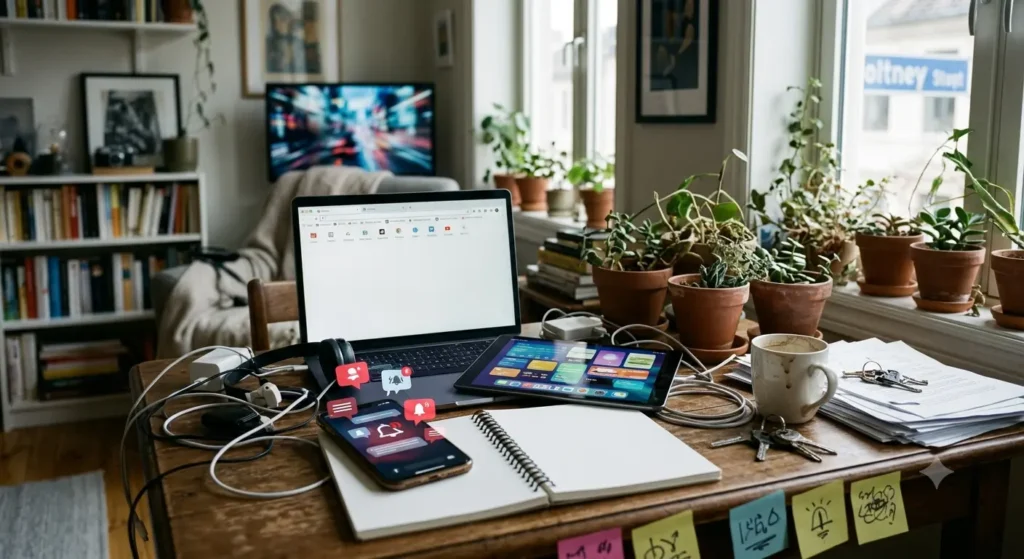
Distraction isn’t one problem. It’s several different problems wearing the same disguise. Some pull your attention from the outside. Others start inside your own head.
1. External distractions
These are the obvious ones: a phone buzzing on the desk, a Slack message popping up mid-sentence, a coworker leaning over to ask a quick question. Add in open-plan office noise, back-to-back meetings, and the constant pull of social media, and it’s easy to see why a “quick check” turns into fifteen lost minutes.
2. Internal distractions
These are harder to spot because there’s nothing external to blame. Your mind wanders to an unrelated worry. A random idea shows up and demands attention. You get bored halfway through a task and start looking for something more interesting to do. None of this shows up as a notification, but it costs just as much focus.
3. Why task switching makes focus harder
Here’s the part most articles skip. When you switch away from an unfinished task, your brain doesn’t fully let go of it. Research by Sophie Leroy, published in Organizational Behavior and Human Decision Processes, found that people who moved to a new task before finishing the first one performed worse on the second task, an effect she called attention residue. Some part of your mind stays with the thing you didn’t finish.
That’s why checking Slack for “just a second” during deep work rarely costs just a second. You come back with a mental hangover from wherever you just were.
What Are the Biggest Workplace Distractions?
| Distraction | Why it happens | What to do |
| Phone | Notifications and habit | Put it out of reach |
| Constant checking | Batch it into set windows | |
| Slack/Teams | Instant messages feel urgent | Set a focus status |
| Social media | Habit and fear of missing out | Block during work hours |
| Coworkers | Unplanned interruptions | Set visible boundaries |
| Noise | Environmental stimulation | Headphones or a quiet space |
| Random thoughts | Mind-wandering | Write them down, don’t act on them |
| Meetings | Fragmented schedule | Protect blocks of uninterrupted time |
How to Handle Distractions You Cannot Remove

Some interruptions can’t be blocked or scheduled away. A coworker still needs an answer. A message still needs a reply. What you can control is how you handle them.
When a coworker interrupts you, use a simple sequence: acknowledge them, capture what they need on your list, give them a specific time you’ll get back to them, then return to what you were doing.
When an urgent message arrives, ask three quick questions: is it actually urgent, does it specifically need me, and can it wait until my next communication block? Most messages fail at least one of those tests.
When your own thoughts interrupt you, use the distraction list from strategy 13. Don’t chase the thought; park it.
To restart after an interruption, leave yourself a short note before you step away: “Next: finish paragraph 3, add the customer example.” Future-you will thank present-you for not having to reconstruct where you left off.
Office vs. Remote Work: How to Avoid Different Types of Distractions
| Environment | Common distractions | Best strategies |
| Office | Coworkers, noise, meetings | Boundaries, headphones, focus blocks |
| Remote | Household, phone, TV | Physical separation, fixed schedule |
| Hybrid | Constant context switching between modes | Keep a consistent routine either way |
| Coworking space | Ambient noise, nearby conversations | Headphones, quiet zones |
Time Blocking vs. Pomodoro vs. Task Batching
| Method | Best for | How it works |
| Time blocking | Protecting calendar time | Assign specific work to specific periods |
| Pomodoro | Getting started, short focus | Alternate short work sprints and breaks |
| Task batching | Reducing switching costs | Group similar tasks so you load context once |
If you struggle to start tasks, try Pomodoro. If your calendar gets hijacked by meetings, try time blocking. If you’re constantly switching between unrelated types of work, task batching will save you the most energy.
The 10-Minute Distraction-Proof Work Setup
Run this before any session where focus actually matters.
- Minute 1: Choose the one task that matters most right now.
- Minutes 2-3: Close every unnecessary tab and app.
- Minute 4: Turn off notifications.
- Minute 5: Put your phone somewhere out of reach.
- Minute 6: Set your Slack or Teams status.
- Minute 7: Open your distraction list, ready to catch stray thoughts.
- Minute 8: Set a focus timer.
- Minutes 9-10: Write down exactly what “done” looks like for this session.
Then start.
How to Measure Whether You’re Actually Becoming Less Distracted
Track these for a week before you decide whether any of this is working.
| Metric | What it tells you |
| Focus sessions completed | Time actually protected for important work |
| Phone checks | How much digital distraction you’re managing |
| Unplanned interruptions | How much your workplace disrupts your day |
| Context switches | How fragmented your attention has been |
| Important tasks completed | Whether it’s translating into real output |
| Communication app checks | How dependent you are on notifications |
Compare your first day’s numbers to your numbers a week later. You’re not aiming for a perfect score. You’re aiming for a clear improvement over your own baseline. If you want to compare notes with other people running similar experiments, communities like r/productivity are full of people testing the same trade-offs.
Common Mistakes That Make Workplace Distractions Worse
- Keeping notifications on “just in case,” when almost nothing actually needs an instant reply.
- Checking email the moment it arrives instead of on a schedule.
- Leaving every browser tab open between tasks.
- Treating every interruption as urgent, which trains people to keep interrupting you.
- Trying to multitask on two demanding tasks at once.
- Setting focus sessions so long and ambitious that you burn out and abandon the system by day three.
- Cutting out every break in the name of productivity.
- Installing five different productivity apps instead of committing to one simple routine.
- Assuming distraction is purely a willpower problem, when most of it is a design problem.
Best Tools for Avoiding Distractions While Working
The right productivity tool can make it easier to protect your attention, but you don’t need a dozen apps to stay focused. Start with the type of distraction you deal with most and explore the best productivity tools that directly address it.
1. Website Blockers
Tools like Freedom and Cold Turkey can block distracting websites and apps during specific times or focus sessions. They’re especially useful when you find yourself opening social media, news sites, or other websites automatically whenever a task gets difficult or boring.
Instead of depending entirely on willpower, a blocker creates a small barrier between you and the distraction. Set up your most distracting sites in advance and schedule blocks during your most important work periods.
2. Focus Timers
A focus timer gives a work session a clear beginning and end. You can use a dedicated productivity app, a browser timer, or simply the timer already built into your phone or computer.
The Pomodoro Technique, for example, typically alternates focused work with short breaks. You can also experiment with longer sessions, such as 50 minutes of work followed by a 10-minute break, depending on the type of work you’re doing.
The goal isn’t to follow a particular timer perfectly. It’s to create a defined period where your only job is to work on the task in front of you.
3. Task Managers
Task managers such as Todoist help keep your priorities visible instead of forcing you to remember everything while you’re working. A simple notebook can work just as well if you prefer something offline.
Before starting a focus session, identify the specific task you want to complete. Having a clear next action reduces the temptation to switch to easier tasks simply because you’re unsure what to work on next.
4. Calendar Tools
Your calendar can be more than a place for meetings. Use it to reserve focus blocks for writing, analysis, planning, coding, research, or other work that requires uninterrupted attention.
Treat these blocks like appointments rather than optional free time. Depending on your workplace, you can also mark yourself as busy or unavailable so coworkers are less likely to schedule meetings during your protected work period. The right workplace productivity tools can also help you schedule, organize, and protect these focused work periods.
5. Noise and Ambient Sound Tools
Noise can be difficult to eliminate, particularly in open offices, shared workspaces, or busy homes. Noise-canceling headphones can reduce background noise, while ambient sound or white-noise apps can help mask conversations and other intermittent sounds.
The best option depends on the person and the task. Some people concentrate better in silence, while others find consistent background noise less distracting than unpredictable sounds around them.
6. Built-In Device Focus Controls
You may not need another productivity app at all. Most modern devices already include tools for reducing interruptions.
- iPhone and iPad: Focus modes can silence notifications and allow only selected people or apps to interrupt you.
- Android: Do Not Disturb and related focus features can restrict notifications and distracting apps.
- Windows: Focus sessions can help create dedicated periods for concentrated work.
- macOS: Focus modes can limit notifications and interruptions across your Mac and other Apple devices.
Before downloading another tool, check the settings you already have. In many cases, turning off unnecessary notifications, enabling a focus mode, and scheduling it for your working hours can solve a large part of the problem.
7. Choose Tools Based on the Distraction, Not the Trend
The goal isn’t to build the most complicated productivity setup. It’s to remove the specific friction that keeps pulling your attention away.
If social media is the problem, start with a website blocker. If you keep forgetting priorities, use a task manager. If meetings are consuming your day, protect focus blocks on your calendar. If noise is the issue, try headphones or ambient sound.
One tool that solves a real problem is usually more useful than five tools that create another system you have to maintain.
Frequently Asked Questions
How can I avoid distractions while working?
Start by identifying your specific distractions instead of guessing. Then remove what you can (phone, notifications, open tabs), protect focused time with time blocking or Pomodoro sessions, and build a plan for the interruptions you can’t avoid, like coworker questions or urgent messages.
Why do I get distracted so easily at work?
Distraction usually comes from a mix of sources: digital notifications, environmental noise, social interruptions, and internal factors like boredom or an unclear task. Task switching also leaves attention residue, which makes it harder to settle back into focus after even a short interruption.
What is the biggest distraction at work?
It varies by person and role, but phones, email, and instant messaging tools consistently rank among the most common culprits across workplace surveys and productivity research.
How do I stop checking my phone while working?
Put it in another room or a drawer, not just face-down on your desk. Studies suggest that even the visible presence of a phone can reduce available attention, so physical distance works better than willpower alone.
How do I stop getting distracted by coworkers?
Make your availability visible with a calendar block, a status message, or headphones, and agree as a team on what counts as urgent enough to interrupt versus what can wait for a scheduled check-in.
Conclusion
If there’s one idea to walk away with, it’s this: don’t build your whole day around resisting distractions through sheer willpower. Willpower can help in the moment, but it becomes much harder to stay focused when your phone is constantly buzzing, Slack is always open, email keeps arriving, and coworkers can interrupt you at any time.
Instead, design your workday so that distractions have fewer opportunities to reach you in the first place. Put your phone out of reach, turn off unnecessary notifications, schedule specific times for email and messages, block distracting websites, and protect focused work on your calendar. At the same time, make your priorities clear so you always know what deserves your attention next.
You also don’t need to eliminate every distraction. Some interruptions are unavoidable, and some are genuinely important. The goal is to reduce unnecessary interruptions, manage the ones you can’t avoid, and make it easier to return to your work when your attention does get pulled away.
That’s the real answer to how to avoid distractions while working. It isn’t about creating a perfectly silent workday or following every productivity technique at once. It’s about building a system that fits the way you actually work.
Start with one or two changes that address your biggest source of distraction, see what improves, and adjust from there. Over time, those small changes can turn focused work from something you constantly have to fight for into a normal part of your workday.

Mehreen Mushtaq is a skilled content writer dedicated to creating high-quality, engaging, and SEO-focused blogs. She specializes in strategic keyword usage, search intent, and informative content that connects with readers while helping websites strengthen their visibility and rankings in search results.