

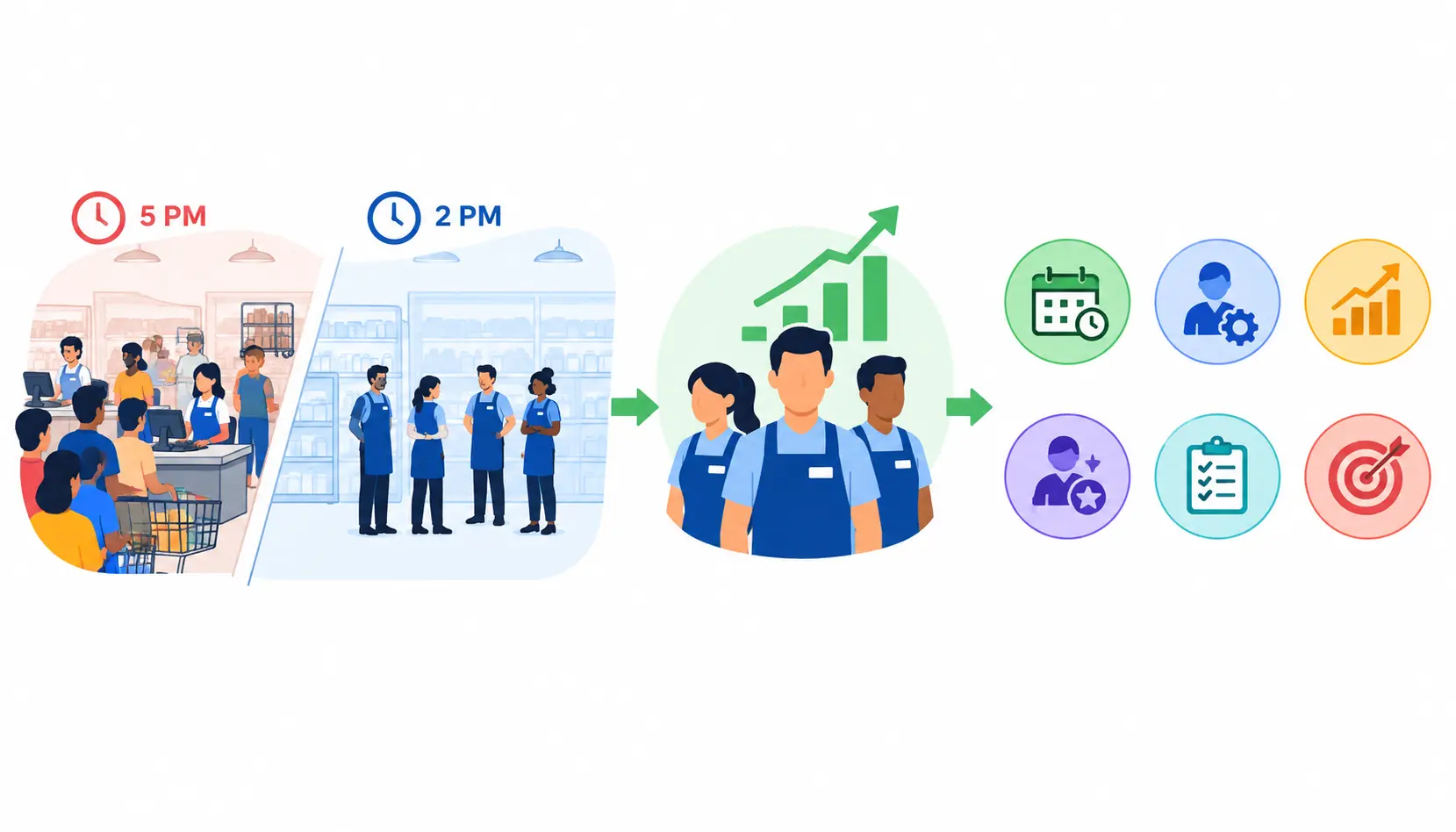
Every store manager knows the feeling. The shop is packed at 5pm, two tills are open, and the replenishment cage is still full from the morning delivery. Then, at 2pm the next day, four people stand around a quiet shop with nothing to do.
That gap between the people you have and the work in front of them is where store-level productivity is won or lost. Improving it does not mean asking your team to work harder. It means removing the waste that gets in their way.
This guide shows you how to spot productivity problems, fix them with ten proven strategies, measure the results with the right KPIs, and keep the gains over time. It starts with the basics and ends with a 30/60/90-day plan you can use next week.
What Is Store-Level Productivity in Retail?
Store-level productivity is how efficiently a single store turns its labour hours and resources into sales, service and completed work. In simple terms, it asks: for the hours we pay for, what do we get back?
It is not only about sales. A store can post strong sales and still be unproductive if it burns overtime, leaves tasks unfinished or loses customers to long queues.
Workforce productivity versus overall store performance
These two ideas overlap, but they are not the same.
- Employee output is what one person gets done in a shift, such as items replenished or customers served.
- Labour efficiency compares that output with the hours and cost it took.
- Task execution is whether the right jobs were finished, on time and to standard.
- Overall store performance is the commercial result: sales, margin and profit.
Overall performance can hide problems. A store in a busy location may hit its sales target even with poor scheduling, simply because customers keep coming. That is why you need to look at the workforce on its own terms.
Why store-level productivity matters
When productivity improves, several things get better at once:
- Labour cost control. Labour is usually one of the largest controllable costs in a store. Better alignment with demand cuts waste without cutting service.
- Sales and service. The right people on the shop floor at the right time means more customers get help and fewer walk out.
- Customer satisfaction and loyalty. Shorter queues, available stock and knowledgeable staff all shape whether people come back.
- Operational consistency. Clear processes mean customers get the same standard whichever shift or store they visit.
- Employee engagement and retention. People stay longer when their schedules are fair and their time is not wasted. Employee engagement is closely tied to how work is organised, not just how people are paid.
What affects retail workforce productivity?
Most productivity problems trace back to a handful of factors:
- Staffing levels compared with real customer demand
- Employee skills and confidence
- Stock availability on the shelf and in the backroom
- Technology and how many manual steps it leaves behind
- Store layout and how far people walk to do routine tasks
- Management practices, including coaching and communication
- Operational processes such as deliveries, handovers and closing routines
Keep this list in mind. Each one is a place to look when something feels off.
How to Identify Productivity Problems in Your Retail Stores
You cannot fix what you have not found. Before changing schedules or buying software, spend a couple of weeks gathering evidence.
Analyse sales, footfall and labour hours
Start by lining up three sets of data: sales, customer traffic (footfall) and labour hours. Look at them by store, day and hour.
You are searching for mismatches. For example, you might find that Saturday between 11am and 2pm produces a large share of weekly sales, but staffing is the same as on a quiet Tuesday. Or you may find that the busiest hour of the week has the fewest people on the floor because of how shifts start and end.
If you do not have footfall counters, transaction counts by hour are a reasonable stand-in.
Identify operational bottlenecks
Walk the store at different times of day and watch where work gets stuck. Common culprits include:
- Checkout queues that build faster than they clear
- Deliveries that arrive at peak trading time and block aisles
- Replenishment that falls behind, leaving gaps on shelves
- Managers buried in paperwork instead of coaching
- Tasks left unfinished at the end of a shift
- Poor handovers, where the next shift does not know what is outstanding
Bottlenecks are rarely about people being lazy. They are usually about unclear priorities or a process that makes simple work slow.
Assess employee skills and workload
Ask a simple question: is the work spread fairly, and do the right people do the right jobs?
Look for skill gaps, such as only one person who can handle returns or a specialist counter. Check for uneven allocation, where a few reliable people absorb most of the tasks. Notice constant interruptions that stop people finishing anything. And check specialist cover: what happens when your one trained person is off sick?
Compare performance across similar stores
Benchmarking works, but only if you compare like with like. A small high-street shop and a large retail park store face very different conditions.
Group stores by format, trading hours, size and demand pattern. Then compare labour efficiency and task completion within each group. Ranking locations on raw sales alone will mislead you.
Create a store productivity audit checklist
Use this short checklist during your first review. Score each line as strong, adequate or weak.
- Demand and staffing alignment: Do staffing levels follow the hourly sales and footfall pattern?
- Labour costs and overtime: Is overtime planned and limited, or does it appear by surprise?
- Customer service and queues: Do customers wait too long to be served or paid?
- Task completion and stock availability: Are daily tasks finished and are shelves full when they should be?
- Training and employee feedback: Do staff feel able to do their jobs well, and are you asking them?
- Technology and manual processes: Which tasks still rely on paper, spreadsheets or messaging groups?
The weak scores show you where to start.
10 Strategies to Optimize Your Workforce and Boost Store-Level Productivity
These strategies build on each other. You do not need to do all ten at once. Pick the two or three that match the problems your audit uncovered.
1. Match staffing levels to customer demand
This is the biggest lever for most retailers. The aim is simple: more people when customers are there, fewer when they are not.
- Use historical sales, footfall, transactions and seasonality to see your normal pattern.
- Forecast staffing needs by day and by hour, not just by week.
- Account for promotions, local events, deliveries and online order picking.
- Compare forecast demand with what actually happened, then adjust next week’s schedule.
Practical example: Say your data shows a steady rush from 12pm to 2pm on weekdays. Put extra people on the floor and tills for those hours. Move non-urgent jobs, such as tidying stockrooms or relabelling, to the quieter mid-afternoon.
2. Build smarter employee schedules
A good schedule balances what the store needs with what people can realistically do.
- Match availability and skills to each shift’s requirements.
- Plan breaks and shift overlaps so cover does not collapse at changeover.
- Reduce unnecessary overtime and last-minute changes.
- Give employees reasonable schedule predictability so they can plan their lives.
- Check the impact on service, not only on labour cost.
A schedule that looks cheap on paper can cost you more if it drives turnover or leaves the shop short at key moments.
3. Assign tasks according to priorities and skills
When everyone is busy but the important jobs still slip, task allocation is usually the problem.
- Separate customer-critical tasks from routine operational work.
- Give every task a clear owner and a deadline.
- Give specialist tasks to people who are trained for them.
- Define priorities for opening, peak trading and closing.
- Review unfinished work each week to spot recurring bottlenecks.
A simple rule helps: customers first, tasks second. If someone is stacking shelves while a queue builds, the system has failed, not the person.
4. Reduce repetitive administrative work
Every hour spent on paperwork is an hour not spent with customers.
- List the manual processes that eat the most time, such as attendance sheets, daily reports and printed checklists.
- Digitise what suits it: attendance, reporting and task management.
- Simplify approvals and shift communication.
- Automate repetitive tasks where it makes sense.
- Point the time you save back at service and store standards.
Start with the tasks that managers complain about most. They are usually the best candidates. Using the right employee productivity tools can help reduce repetitive admin, improve team communication and give store managers more time to focus on customers.”
5. Improve frontline employee training
Training is not a one-off induction. It is how you raise accuracy, speed and confidence.
- Identify skills gaps for each role.
- Provide solid onboarding and product knowledge.
- Use short, easy-to-access learning, such as five-minute briefings, rather than long sessions that pull people off the floor.
- Cross-train people for several roles so you can flex cover.
- Measure results. Did errors fall? Did service scores rise?
Cross-training deserves special mention. A team where several people can work the till, handle returns and replenish is far easier to schedule.
6. Strengthen communication between store teams
Many productivity losses come from people not knowing what is happening.
- Set up clear shift handovers covering what is done, what is outstanding and what to watch.
- Share promotions, operational changes and stock updates before they affect the shop floor.
- Make policies and instructions easy to find.
- Use suitable mobile tools so information reaches people who are not at a desk.
- Create a simple way for staff to report recurring issues, and show them what you did about it.
7. Improve stock availability and store workflows
Staff cannot sell what is not on the shelf, and they waste time hunting for what is.
- Coordinate replenishment with trading patterns.
- Cut the time people spend searching for stock or information.
- Review the backroom for layout and handling problems.
- Schedule deliveries and replenishment work so they do not collide with peak trading.
- Track out-of-stocks and note how often they cost you a sale.
8. Use workforce management technology effectively
Technology helps when it supports a good process. It cannot replace one.
Workforce management tools typically cover several areas:
- Scheduling and labour forecasting: building rosters from expected demand.
- Time and attendance: recording hours accurately.
- Digital task management: assigning and tracking jobs.
- Employee self-service: letting staff swap shifts or request leave.
- Dashboards and analytics: showing labour and performance data in one place.
- Integration with POS and other systems: feeding sales data into forecasts.
For background on the wider discipline, see this overview of workforce management.
9. Improve employee engagement and retention
Turnover is expensive. New starters take time to become productive, and gaps in the team hurt service meanwhile.
- Offer fair and predictable schedules.
- Set clear expectations and achievable targets.
- Recognise good work and strong service.
- Give people chances to build new skills.
- Watch workload, fatigue, absence and turnover patterns for early warning signs.
If you want a candid view of what frontline retail staff say about scheduling and workload, browsing communities such as Retail can be eye-opening. Treat it as anecdotal feedback, not data, but the recurring themes are worth noticing.
10. Use data to improve store manager decisions
Managers make better calls when they can see what is happening.
- Set store-level productivity targets that are realistic for the store.
- Review performance by shift, department and store.
- Investigate unusual results before reacting.
- Try coaching and process fixes before assuming someone is underperforming.
- Pilot changes in one store before rolling them out widely.
The last point matters. A pilot lets you learn cheaply and avoid spreading a mistake across your estate.
Which KPIs Should You Track to Measure Store-Level Productivity?
A key performance indicator (KPI) is a measurable value that shows how well you are hitting an objective. Pick too few and you miss problems. Pick too many and nobody acts on them.
Sales and commercial performance metrics
- Sales per labour hour: how much revenue each paid hour generates.
- Conversion rate: the share of visitors who buy.
- Average transaction value: the typical spend per purchase.
- Units per transaction: how many items go in each basket.
- Gross margin: the profit left after the cost of goods.
Labour efficiency metrics
- Labour cost percentage: labour cost as a share of sales.
- Overtime: hours worked beyond contracted time.
- Schedule adherence: how closely actual working matches the plan.
- Actual versus planned labour hours: the gap between what you scheduled and what you used.
Operational efficiency metrics
- Task completion: the share of assigned tasks finished on time.
- Replenishment time: how long stock takes to get from delivery to shelf.
- Stock availability: how often products are on the shelf when customers want them.
- Queue time: how long customers wait to be served.
- Order fulfilment: speed and accuracy of click-and-collect or delivery orders, where relevant.
Customer and employee performance metrics
- Customer satisfaction and service quality scores
- Employee engagement
- Absenteeism
- Staff turnover
Retail productivity formulas with examples
Here are the most common formulas in plain form.
| KPI | Formula | Example |
| Sales per labour hour | Net sales ÷ labour hours | £12,000 ÷ 200 hours = £60 per hour |
| Labour cost % | Labour cost ÷ net sales × 100 | £2,400 ÷ £12,000 × 100 = 20% |
| Conversion rate | Transactions ÷ footfall × 100 | 300 ÷ 1,000 × 100 = 30% |
| Average transaction value | Net sales ÷ transactions | £12,000 ÷ 300 = £40 |
| Units per transaction | Units sold ÷ transactions | 750 ÷ 300 = 2.5 units |
| Gross margin % | (Sales − cost of goods) ÷ sales × 100 | (£12,000 − £7,200) ÷ £12,000 × 100 = 40% |
| Labour hours variance | (Actual − planned hours) ÷ planned hours × 100 | (210 − 200) ÷ 200 × 100 = 5% over |
| Absence rate | Days absent ÷ days scheduled × 100 | 12 ÷ 240 × 100 = 5% |
| Staff turnover rate | Leavers ÷ average headcount × 100 | 6 ÷ 30 × 100 = 20% |
The figures above are illustrative, not benchmarks. To calculate output per labor hour, use this labor productivity calculator to compare workforce output with the hours worked.
How to read them. If a store generates £12,000 in net sales over 200 labour hours, its sales per labour hour is £60. That is useful, but it does not prove the store is profitable or well run. A store could hit £60 by running too lean, leaving customers waiting and staff exhausted.
Always read one KPI alongside others. If sales per labour hour rises while queue time and satisfaction fall, you have probably cut too deep.
How to build a balanced store productivity dashboard
Group your KPIs into five areas so you see the whole picture:
- Commercial results: sales per labour hour, conversion, average transaction value
- Labour efficiency: labour cost percentage, overtime, schedule adherence
- Operational execution: task completion, stock availability, replenishment time
- Customer outcomes: queue time, satisfaction, service quality
- Employee outcomes: engagement, absence, turnover
Choose two or three measures from each group at most. A dashboard people actually read beats a complete one they ignore. For more ideas on measuring workforce performance, explore these employee productivity metrics and adapt the measures to your store’s roles and operational goals.”
How Workforce Management Software Can Improve Retail Productivity
Workforce management software helps retailers forecast demand, build schedules, record time, assign tasks and report on labour in one place. Used well, it replaces guesswork and spreadsheets with consistent, visible data.
What features should retailers look for?
- Demand forecasting and scheduling
- Time and attendance
- Shift management, including swaps and open shifts
- Task assignment and tracking
- Mobile access for employees
- Reporting and analytics
- Integration with your existing retail systems
Workforce management software versus manual scheduling
| Factor | Manual scheduling | Workforce management software |
| Setup effort | Low to start | Higher at the start |
| Visibility | Limited to whoever holds the file | Shared across managers and teams |
| Consistency | Varies by manager | Common rules across stores |
| Scalability | Gets harder with more stores | Built for multiple locations |
| Reporting | Often manual | Usually automated |
| Ongoing cost | Mostly manager time | Subscription and support costs |
For a single small store, a well-kept spreadsheet may be enough. As you add locations, the time cost and inconsistency of manual methods usually grow.
How to evaluate workforce management solutions
- Map your problems first. Write down what you need to fix, such as overtime or peak-hour gaps.
- Check integration and data quality. Forecasts are only as good as the sales and attendance data feeding them.
- Compare total cost of ownership. Include setup, training, support and any extra modules.
- Test usability. Store managers and frontline staff must find it easy, or they will work around it.
- Run a pilot. Measure results in a few stores before a wider rollout.
The role of AI in retail workforce optimisation
AI can help with three things: forecasting demand, suggesting staffing levels and spotting patterns that humans miss, such as repeated understaffing on certain days.
But treat it as an assistant, not an authority. Forecasts depend on the quality of past data, and they struggle with unusual events. Managers should review and override recommendations when local knowledge says otherwise.
Privacy matters too. Be open with employees about what data you collect and how you use it, and follow the data protection rules that apply where you operate.
Examples of retail workforce management platforms
Rather than rank products, it is more useful to think in categories:
- Dedicated workforce management suites that combine forecasting, scheduling and attendance
- Shift and task apps focused on simple rostering and team communication
- Modules inside HR or payroll systems that add scheduling to existing records
- Retail platform add-ons that link scheduling directly to POS data
Features and pricing change often. Always check current vendor documentation and ask for a demo with your own store data before you decide.
Common Workforce Optimization Mistakes Retailers Should Avoid
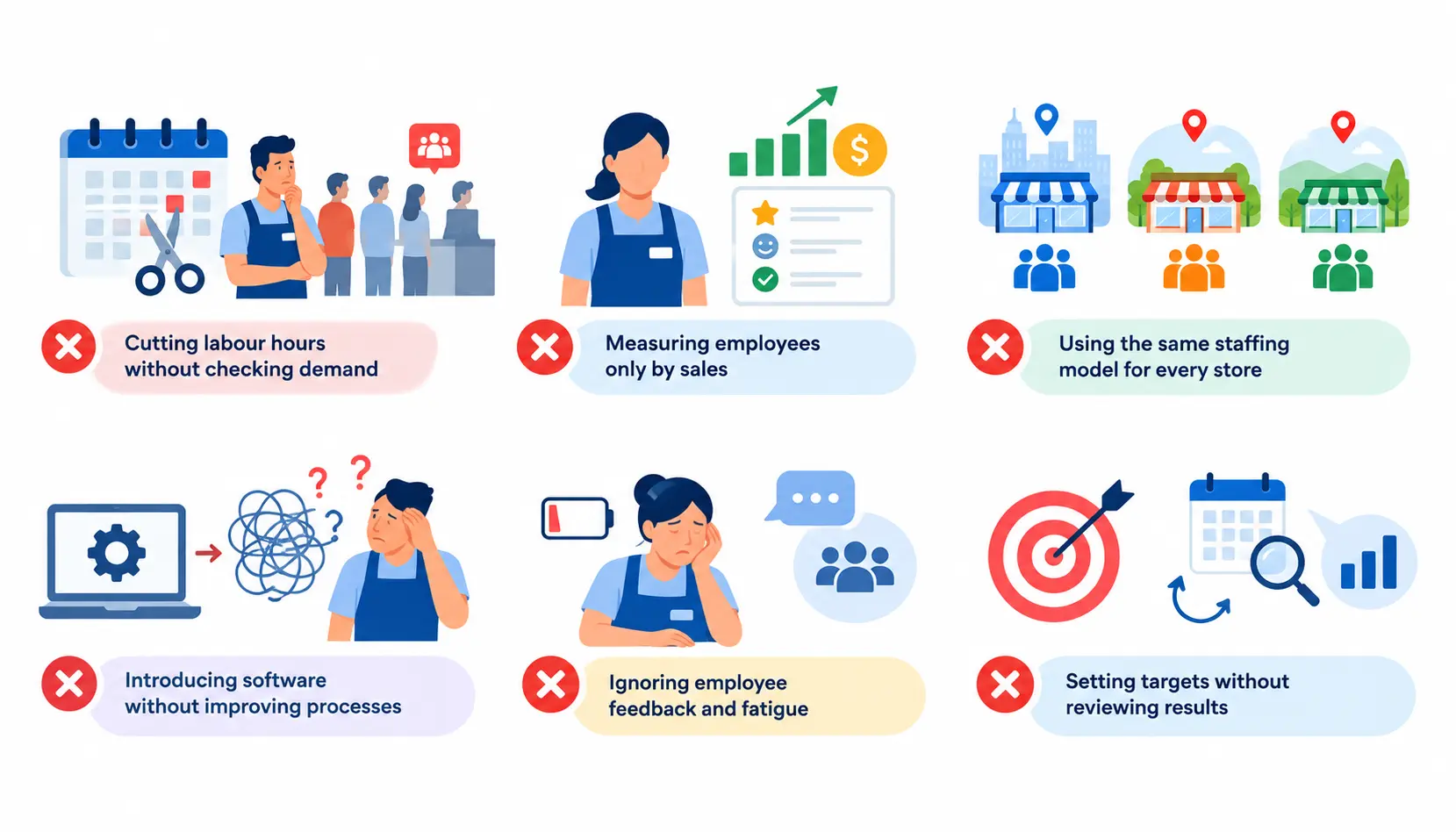
Cutting labour hours without checking demand
Across-the-board cuts look tidy on a budget. In practice, understaffing creates queues, missed sales and unfinished work. Cut where the data shows slack, not everywhere.
Measuring employees only by sales
Sales targets ignore service quality, task execution and luck. One person may work a busy counter and another a quiet aisle. Judge people on a mix of measures they can actually control.
Using the same staffing model for every store
Stores differ in size, location, product mix and customer patterns. A model that works in a city-centre shop may overstaff a rural one. Build staffing from each store’s own demand.
Introducing software without improving processes
Software speeds up whatever process you have. If roles are unclear or training is weak, a new system will only make the confusion faster. Fix the basics first, then automate.
Ignoring employee feedback and fatigue
Unrealistic workloads and unpredictable schedules drive absence and turnover. Ask your team what slows them down. They often know the answer before the data does.
Setting targets without reviewing results
A target set in January and never revisited is not management. Review results regularly and change course when the evidence says so.
A 30/60/90-Day Plan to Improve Store-Level Productivity
This plan keeps the work manageable. You do not need a big programme to start.
Days 1–30: Audit and establish a baseline
- Collect sales, labour, footfall and operational data.
- Identify the biggest productivity bottlenecks.
- Choose a small set of priority KPIs.
- Gather feedback from store managers and employees.
Days 31–60: Test improvements
- Pilot demand-based scheduling or revised task allocation in one or two stores.
- Tackle the highest-impact training and workflow gaps.
- Review performance weekly.
- Compare results with your baseline and, where possible, with a similar store that has not changed.
Days 61–90: Refine and scale
- Review commercial, operational, customer and employee outcomes together.
- Adjust schedules and processes based on what you learned.
- Document what worked, so others can copy it.
- Roll changes out to comparable stores where the evidence supports it.
How to calculate the impact of productivity improvements
Compare the pilot period with your baseline, then adjust for other factors that could distort the result. Promotions, seasonal swings, opening-hour changes and local events can all move sales on their own.
The cleanest method is a comparison store. If your pilot store’s sales per labour hour rose 8% while similar stores rose 2% over the same weeks, the better estimate of your impact is the difference. Also check that service and employee measures did not slip.
How to sustain improvements across multiple locations
- Agree common KPI definitions so every store measures the same way.
- Hold regular store reviews, weekly for operations and monthly for trends.
- Make managers accountable for acting on the numbers.
- Build a feedback loop so stores can flag what is and is not working.
Share practical lessons between managers, too. Professional networks such as LinkedIn are a good place to follow retail operations practitioners and compare approaches, as long as you check ideas against your own data.
Frequently Asked Questions
1. How can retailers improve store-level productivity quickly?
Start with the most visible bottlenecks: peak-hour understaffing, poor task allocation and repetitive admin work. Fix one at a time and measure the effect of each change.
2. What is the most important retail workforce productivity KPI?
There is no single best KPI. Sales per labour hour is a good starting point, but review it alongside labour costs, customer outcomes and operational performance.
3. How can retailers reduce labour costs without hurting service?
Match staffing to demand, improve scheduling accuracy and cut wasted time. Watch service indicators, such as queue time and satisfaction, whenever you adjust labour.
4. How often should store managers review productivity?
Check staffing and task execution frequently, ideally daily or per shift. Use weekly and monthly reviews for wider trends. The right rhythm depends on store size and trading patterns.
5. Can workforce management software improve store productivity?
Yes, it can improve visibility, scheduling, communication and task coordination. Results depend on how well it is implemented, the quality of your data, staff adoption and how well the system fits your needs.
6. How can retailers compare productivity across multiple stores?
Use the same KPI definitions everywhere and compare similar locations. Account for differences in size, opening hours, demand and format.
Conclusion
Store-level productivity is not a project you finish. It is a habit of looking at demand, checking how your team spends its time and fixing what gets in the way.
Start small. Audit one store, pick a few KPIs, and fix the biggest bottleneck. Match staffing to demand, give people clear tasks and fair schedules, and measure the results honestly.
Do that consistently and the benefits add up: lower waste, happier customers and a team that wants to stay. Over time, store-level productivity becomes part of how you run the business, not an extra job on top of it.

Mehreen Mushtaq is a skilled content writer dedicated to creating high-quality, engaging, and SEO-focused blogs. She specializes in strategic keyword usage, search intent, and informative content that connects with readers while helping websites strengthen their visibility and rankings in search results.