

Many companies say they have gone digital. Yet invoices still arrive by email, approvals wait in someone’s inbox, and staff retype the same data into three systems. The tools are digital. The work is still manual.
Digital business process automation closes that gap. It connects people, rules, data and software into coordinated workflows that run with little manual effort. This guide explains how it works, how it differs from BPA, DPA, RPA and BPM, what to automate first, and how to measure results.
What Is Digital Business Process Automation?
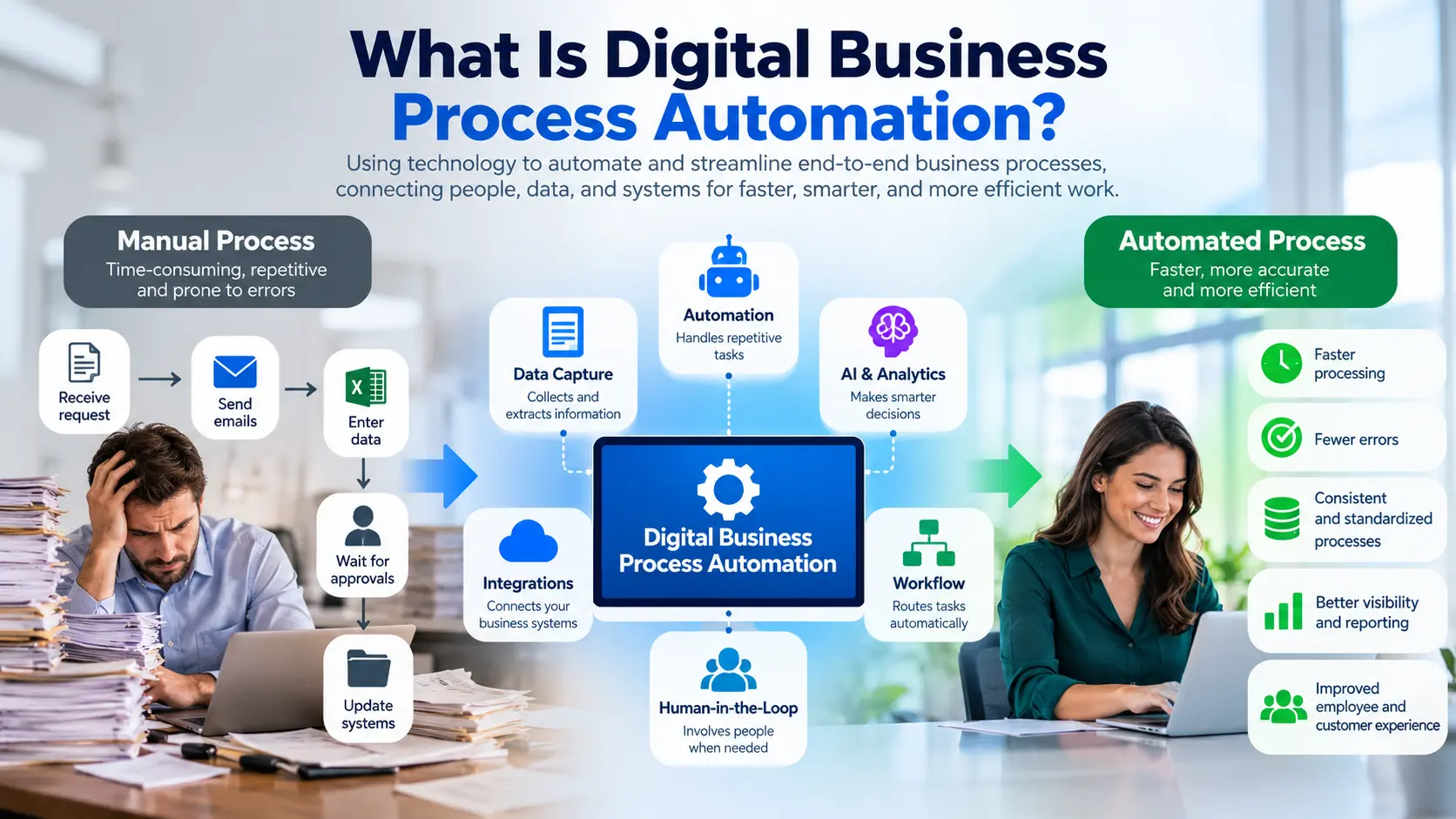
Digital Business Process Automation Definition
Digital business process automation is the use of software, integrations and rules to run end-to-end business processes with minimal manual effort. It connects applications, data and people in one workflow, routes work automatically, handles exceptions through human review, and tracks results so the process can keep improving.
It is a practical umbrella idea. It sits across business process automation (BPA) and digital process automation (DPA), two terms that search results often mix together.
What Does “Digital” Add to Traditional Business Process Automation?
Older automation often meant scripts or rigid systems inside one department. The “digital” layer brings:
- Connected applications: workflows that span ERP, CRM, email and finance tools.
- Cloud platforms: faster setup and easier scaling.
- APIs: systems exchange data directly instead of through manual copying.
- Real-time data: decisions use current information.
- Web and mobile interactions: employees and customers act on tasks from any device.
- AI: models read documents, classify requests and support decisions.
- Analytics: dashboards show where work slows down.
Why Digital Business Process Automation Matters
Manual processes don’t scale well. Every new customer, invoice or hire adds more hand-offs and more chances for delay. Automation helps you handle more work without adding the same amount of effort.
It also supports consistency and digital transformation. The same rules apply every time, and every step leaves a record.
How Does Digital Business Process Automation Work?
Most automated processes follow the same flow:
Trigger → Capture → Validate → Decide → Execute → Human Exception → Update Systems → Measure
Trigger
Something starts the process. It might be an email arriving, a form submission, a new hire record or a scheduled time.
Data Capture
The system collects the information it needs. That could be form fields, data from another system, or text pulled from a document using OCR (optical character recognition).
Business Rules and Decision Logic
Rules decide what happens next. For example: “If an invoice is under a set amount and matches a purchase order, approve it automatically.”
Workflow Routing
The workflow sends work to the right person or system. It follows rules about role, amount, region or priority.
System Integration
Integrations move data between systems without retyping. This is where much of the value, and much of the difficulty, sits.
Human Review and Exception Handling
Not everything fits the rules. The system flags exceptions and routes them to a person. After the decision, the workflow continues.
Monitoring and Continuous Improvement
The system records timing, volumes and errors. Teams use that data to find bottlenecks and improve the process.
Digital Business Process Automation vs BPA, DPA, RPA, BPM and Workflow Automation
These terms overlap, and vendors use them differently. Here is a practical way to separate them.
| Approach | Focus | Scope | Human involvement | Best use | Example |
|---|---|---|---|---|---|
| Digital business process automation | End-to-end digital workflows | Cross-system process | Exceptions and approvals | Coordinated processes | Customer onboarding |
| BPA | Executing business processes automatically | Process | Varies | Rules-based processes | Invoice approval |
| DPA | Digitizing end-to-end processes, often with low-code | Process or workflow | Often includes human steps | Processes with forms and approvals | Digital service request |
| RPA | Repetitive user-interface tasks | Task | Low | Legacy systems without APIs | Copying records between systems |
| BPM | Modeling, managing and improving processes | Organization-wide | High | Redesigning processes | Redesigning order-to-cash |
| Workflow automation | Routing work between steps | Workflow | Moderate | Approvals and hand-offs | Approval routing |
Digital Business Process Automation vs Business Process Automation
BPA is the broader, older term for automating business processes. Digital business process automation emphasizes modern, connected, cloud and API-based approaches. In practice, many people use them interchangeably.
Digital Business Process Automation vs Digital Process Automation
DPA usually stresses digitizing end-to-end processes, often with low-code tools and a good user experience for the people involved. Digital business process automation includes that idea and also covers back-office and system-to-system automation.
DPA vs RPA
RPA automates tasks by mimicking clicks and keystrokes in a user interface. DPA automates whole processes. RPA is often a bridge for older systems that lack APIs. DPA is usually the better foundation when systems can connect directly.
BPA vs BPM
BPM is about understanding, modeling and improving how processes run. BPA is about automating them. BPM often comes first: you design a good process, then automate it.
Workflow Automation vs Process Automation
Workflow automation moves work between steps, such as sending a request to the right approver. Process automation covers the whole process, including data, rules, integrations and monitoring.
Intelligent Automation vs Traditional Automation
Traditional automation follows fixed rules. Intelligent automation adds AI, such as reading documents, classifying requests or suggesting decisions. It handles messier inputs but needs monitoring, since AI can be wrong.
Key Technologies Behind Digital Business Process Automation
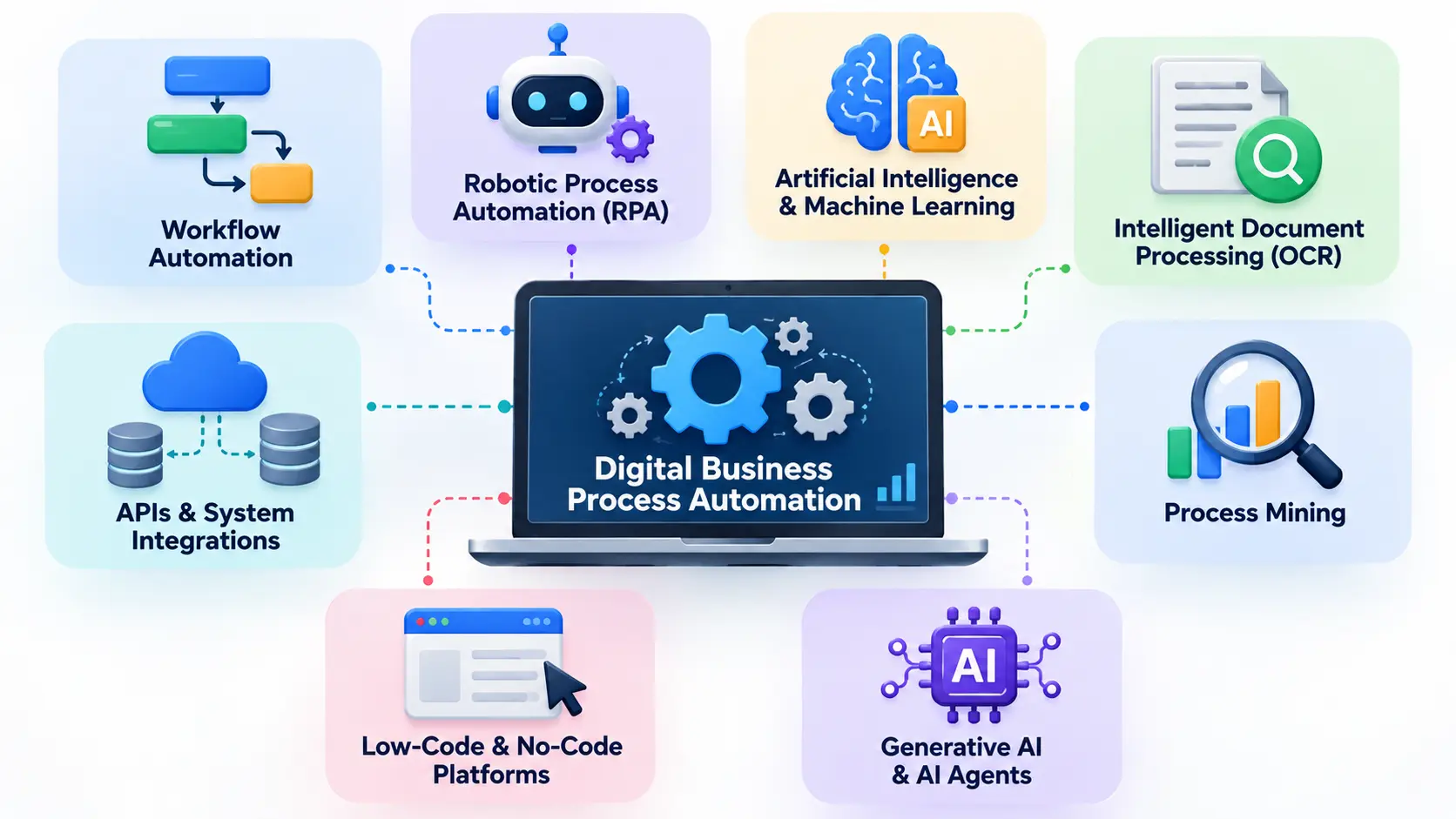
Workflow Automation
This is the backbone. It defines steps, owners, rules and timing. Most automation projects start here.
Robotic Process Automation
RPA “bots” perform repetitive screen-based tasks. They help when a system has no usable API. They can be fragile if screens change, so plan for maintenance.
Artificial Intelligence and Machine Learning
Machine learning finds patterns in data. In processes, it can classify tickets, flag unusual invoices or predict delays.
Generative AI and AI Agents
Generative AI can draft responses, summarize documents and extract information from unstructured text. AI agents go further by taking multi-step actions toward a goal. Both need guardrails, since outputs can be inaccurate.
Process Mining
Process mining analyzes system logs to show how processes actually run. It reveals hidden bottlenecks and variations, so you can pick what to automate based on evidence.
Intelligent Document Processing and OCR
OCR turns scanned images into text. Intelligent document processing goes further by identifying fields such as invoice numbers and totals, and validating them.
APIs and System Integrations
APIs let systems share data directly. They are usually more reliable than screen-based RPA.
Low-Code and No-Code Platforms
These tools let business users and developers build workflows visually. They speed up delivery but still need governance so that teams don’t build conflicting or unmanaged automations.
What Are the Benefits of Digital Business Process Automation?
- Higher operational efficiency: less time spent on routine work.
- Lower manual work and operating costs: staff focus on higher-value tasks.
- Faster cycle times: fewer waiting steps between hand-offs.
- Fewer manual errors: automation can reduce mistakes in repetitive, rules-based work. Poor rules or bad source data can create new errors, so it isn’t a guarantee.
- Better standardization: the same steps run the same way every time.
- Greater visibility: managers can see where work sits.
- Stronger compliance and auditability: each step can be logged.
- Better employee experience: less tedious data entry.
- Improved customer experience: faster, more predictable responses.
- Easier scalability: volume can grow without matching growth in manual effort.
Before vs After Automation
| Area | Before automation | After automation |
|---|---|---|
| Data entry | Typed by hand | Captured and validated automatically |
| Approvals | Chased by email | Routed by rules with reminders |
| Visibility | Unknown status | Real-time tracking |
| Errors | Found late | Checked at entry |
| Audit trail | Scattered records | Stored with each step |
| Scaling | Add staff | Add capacity to the workflow |
10 Digital Business Process Automation Examples
Each example follows the pattern: manual problem, automated workflow, outcome, KPI.
1. Invoice Processing
- Manual problem: Staff download attachments, key in data, email managers and wait for approval.
- Automated workflow: The invoice is captured, data is extracted, matched to a purchase order, routed by approval rules, and posted to accounting. Mismatches go to a person.
- Outcome: Faster approvals and a clean audit trail.
- KPI: Cost per invoice; cycle time.
2. Employee Onboarding
- Manual problem: HR, IT and managers coordinate by email.
- Automated workflow: A new hire record triggers account setup, equipment requests, training assignments and manager tasks.
- Outcome: New hires start with what they need.
- KPI: Time to full setup.
3. Customer Onboarding
- Manual problem: Forms and checks move between teams by hand.
- Automated workflow: Digital forms, identity and document checks, and automatic account creation, with human review for flagged cases.
- Outcome: Faster activation.
- KPI: Time to activate; drop-off rate.
4. Purchase Order and Procurement Approvals
- Manual problem: Requests wait in inboxes.
- Automated workflow: Requests route by amount and department, with budget checks.
- Outcome: Clearer spending control.
- KPI: Approval time; policy compliance.
5. Customer Service Ticket Routing
- Manual problem: Agents sort tickets by hand.
- Automated workflow: Tickets are classified by topic and urgency and sent to the right team.
- Outcome: Faster first response.
- KPI: Response time; reassignment rate.
6. Lead Management and Sales Handoffs
- Manual problem: Leads sit unassigned or get lost.
- Automated workflow: New leads are scored, assigned and followed up automatically.
- Outcome: Fewer missed leads.
- KPI: Time to first contact.
7. Contract Approval and Renewal
- Manual problem: Contracts circulate by email and renewals get missed.
- Automated workflow: Templates, approval routing, e-signature and renewal alerts.
- Outcome: Fewer missed renewals.
- KPI: Contract cycle time.
8. Order Processing
- Manual problem: Orders are re-entered across systems.
- Automated workflow: Orders flow from storefront to inventory to fulfillment to invoicing.
- Outcome: Fewer keying errors.
- KPI: Order cycle time; error rate.
9. Compliance Reporting
- Manual problem: Teams gather data from many sources before every deadline.
- Automated workflow: Data is pulled on schedule, checked and compiled into reports, with reviewer sign-off.
- Outcome: Reliable reporting.
- KPI: Report preparation time.
10. IT Service Requests
- Manual problem: Requests arrive by chat and email.
- Automated workflow: A portal collects requests, routes them, and automates routine ones such as password resets or access grants with approval.
- Outcome: Faster resolution for routine requests.
- KPI: Time to resolve; share resolved automatically.
Which Business Processes Should You Automate?
Characteristics of a Good Automation Candidate
Look for processes that are:
- Repetitive
- High volume
- Rules based
- Time consuming
- Error prone
- Stable
- Measurable
Automation Opportunity Scoring Framework
Score each candidate process across these factors.
| Factor | Low priority | Medium priority | High priority |
|---|---|---|---|
| Volume | Few cases per month | Moderate | Hundreds or more |
| Manual effort | Minutes per case | Moderate | Hours per case |
| Error rate | Rare | Occasional | Frequent, costly |
| Process stability | Changes often | Some change | Stable rules |
| Business impact | Minor | Moderate | Critical to revenue, cost or risk |
| Automation complexity | Very complex | Moderate | Simple, well integrated |
Adjust the thresholds to your organization. The aim is a ranked list, not a perfect number.
Which Processes Should Not Be Automated?
Be cautious with processes that are:
- Rarely performed, since the effort won’t pay back
- Constantly changing, since you will keep rebuilding
- Poorly defined, so nobody agrees how it should run
- Dependent on subjective judgment
- Full of unpredictable exceptions
- Already inefficient by design
Automating a bad process just makes it fail faster.
Should You Fix a Process Before Automating It?
Generally, yes. If a workflow has unnecessary steps, duplicate approvals or unclear ownership, simplify it first. Then automate the improved version.
How to Implement Digital Business Process Automation Step by Step
- Define the business problem. State the outcome you want, such as shorter invoice approval time.
- Map the current process. Document steps, owners, systems and hand-offs. A notation such as BPMN can help.
- Identify bottlenecks and manual work. Note waits, rework and repeated data entry.
- Prioritize opportunities. Use the scoring table above.
- Define KPIs and success criteria. Capture baseline figures before changing anything.
- Choose the right technology. Match the tool to the need: workflow tool, RPA, AI or a mix.
- Design the future-state workflow. Include exception paths and human review.
- Integrate existing systems. Prefer APIs. Use RPA where there is no alternative.
- Test with a pilot. Start with one process or team.
- Train employees and manage change. Explain what changes and why. Give people a way to report problems.
- Measure results. Compare against your baseline.
- Optimize and scale. Fix issues from the pilot before expanding.
Failure example: A team automates approvals but never maps the process. They find later that three departments approve the same items in different orders. The automation just speeds up the confusion.
Success example: A team maps the process first, removes a redundant approval, and pilots with one department. The pilot surfaces a data problem early, when it is cheap to fix.
How to Choose Digital Business Process Automation Software
Use a checklist instead of a vendor ranking. Ask whether the platform offers:
| Area | What to check |
|---|---|
| Workflow builder | Visual design, reusable components, versioning |
| Low-code/no-code | Who can build, and with what controls |
| Integration and API support | Connectors for your ERP, CRM and finance tools |
| AI capabilities | Document extraction, classification, and what is actually available today |
| RPA support | Built in or via partners |
| Analytics and monitoring | Bottleneck views, KPI dashboards |
| Human-in-the-loop controls | Task inboxes, escalation, audit of overrides |
| Security and compliance | Access controls, logging, encryption, certifications |
| Scalability | Volume limits, multi-team support |
| Governance and administration | Approval of new automations, monitoring, ownership |
| Total cost of ownership | Licenses, implementation, maintenance, training |
Run a proof of concept on one real process before committing. Ask vendors for documentation, not only demos.
How to Measure Digital Business Process Automation ROI
Establish a Baseline Before Automation
Measure the current process first: cost, time, volume and error rates. Without a baseline, you can’t prove improvement.
Important Automation KPIs
- Cycle time
- Cost per transaction
- Error rate
- Manual hours
- Automation rate
- Straight-through processing rate (share of cases completed with no human touch)
- Exception rate
- SLA compliance
- Customer response time
- Employee productivity
Digital Business Process Automation ROI Formula
ROI (%) = (Quantified benefits − Automation costs) ÷ Automation costs × 100
Use annual figures for both benefits and costs. Include licenses, implementation, training and ongoing maintenance.
Simple ROI Example
This is a hypothetical example for illustration only.
A finance team handles a set number of invoices each month. Suppose automation saves the equivalent of $60,000 a year in staff time and rework, and costs $40,000 a year including licenses and maintenance.
ROI = ($60,000 − $40,000) ÷ $40,000 × 100 = 50%
Use your own baseline data. Treat soft benefits, such as better employee experience, separately from the formula.
Challenges and Risks of Digital Business Process Automation
- Automating a broken process. See the earlier section on fixing first.
- Legacy system integration. Older systems may lack APIs.
- Poor data quality. Bad input produces bad output.
- Security and privacy risks. Automations often hold credentials and touch sensitive data.
- Employee resistance. People worry about job security or extra work.
- Too many automation tools. Separate teams can create overlapping tools and silos.
- Excessive exceptions. If most cases need review, the automation adds little.
- Lack of governance. Nobody owns or monitors the automations.
- Automation maintenance. Rules, screens and integrations change over time.
- Scaling beyond the pilot. A pilot that worked for one team may fail when volume or variety grows.
Industry guidance, including IBM’s, commonly points to scaling, coordinating human and automated work, and poor process documentation as recurring challenges.
Digital Business Process Automation Best Practices
- Start with business outcomes, not technology.
- Standardize before you automate.
- Start small and prove value.
- Keep humans in high-judgment decisions.
- Design for exceptions. Plan what happens when data is missing or a rule fails.
- Integrate rather than create new silos.
- Establish governance. Assign owners, review changes and log activity.
- Monitor KPIs continuously.
- Optimize before scaling.
What Is the Role of AI in Digital Business Process Automation?
Rule-Based Automation vs AI-Powered Automation
Rule-based automation follows “if this, then that.” AI-powered automation handles unstructured inputs, like free-text emails or varied invoice layouts. It brings flexibility, and also uncertainty, since AI outputs can be wrong.
AI for Document and Data Processing
AI can read documents, extract fields and flag missing information. Always validate extracted data against rules or source records.
AI for Classification and Routing
Models can sort requests by topic or urgency and route them to the right team.
AI for Decision Support
AI can recommend an action or risk score for a person to review. This works well where the stakes are moderate and the decision benefits from a second opinion.
Generative AI in Business Workflows
Generative AI can draft replies, summarize case histories and prepare reports. Have staff review drafts for customer-facing or regulated content.
AI Agents and Agentic Process Automation
AI agents can plan and carry out multi-step tasks using tools. They are an emerging area. Start with low-risk tasks, limit permissions and log every action.
Where Human Oversight Is Still Necessary
Keep people involved in decisions with legal, financial or ethical consequences, in unusual cases, and wherever the AI’s confidence is low.
Digital Business Process Automation Maturity Model
| Stage | Technology | Characteristics | Next step |
|---|---|---|---|
| 1. Manual | Email, spreadsheets | Manual data entry, little visibility | Map processes |
| 2. Task automation | RPA, scripts, macros | Individual tasks automated | Connect tasks into workflows |
| 3. Workflow automation | Workflow tools | Multiple tasks linked, approvals automated | Integrate systems end to end |
| 4. End-to-end automation | APIs, integration platforms | Departments and systems connected | Add analytics and AI |
| 5. Intelligent and adaptive | AI, process mining, analytics | Continuous optimization and decision support | Govern and refine |
Stage 1: Manual Processes
Work runs on email, spreadsheets and manual entry.
Stage 2: Task Automation
Individual repetitive tasks are automated, often by RPA or scripts.
Stage 3: Workflow Automation
Tasks connect into workflows with routing and approvals.
Stage 4: End-to-End Process Automation
Systems and departments integrate, so work flows across the process.
Stage 5: Intelligent and Adaptive Automation
AI, analytics and process mining help optimize the process on an ongoing basis.
Most organizations sit at different stages in different areas. That’s normal. Use the model to decide your next step, not to score yourself.
Future of Digital Business Process Automation
These are emerging directions, not certainties.
- AI-native workflows: processes designed around AI from the start.
- Agentic automation: AI agents taking on more multi-step work under supervision.
- Greater process intelligence: deeper analytics showing how work really flows.
- More human-AI collaboration: people handling judgment while AI handles preparation.
- Continuous process optimization: systems that suggest improvements as they run.
Treat vendor predictions with caution and test any new capability on a low-risk process first.
Frequently Asked Questions About Digital Business Process Automation
What is digital business process automation?
It is the use of software, integrations and rules to run end-to-end business processes with minimal manual effort, connecting systems and people in one tracked workflow.
What is an example of digital business process automation?
Invoice processing: the system captures the invoice, extracts the data, matches it to a purchase order, routes approvals and updates accounting, with exceptions sent to a person.
What is the difference between BPA and DPA?
BPA is the broader idea of automating business processes. DPA usually stresses digitizing end-to-end processes, often with low-code tools and a strong user experience. The terms overlap.
What is the difference between DPA and RPA?
DPA automates whole processes. RPA automates individual tasks by mimicking user actions in an interface, and is often used with older systems.
What business processes can be automated?
Repetitive, high-volume, rules-based processes such as invoicing, onboarding, approvals, ticket routing and reporting.
What processes should not be automated?
Rare, constantly changing, poorly defined or judgment-heavy processes, and processes that are inefficient by design.
How does AI improve business process automation?
AI helps with unstructured inputs: reading documents, classifying requests and supporting decisions. It needs monitoring because it can make mistakes.
Is digital business process automation expensive?
Cost varies widely with scope, tools and integration needs. Starting with a small pilot limits risk. Compare costs to a measured baseline.
Can small businesses use business process automation?
Yes. Low-code and no-code tools make basic workflow automation accessible. Start with one repetitive process.
Does business process automation replace employees?
It often changes roles more than it removes them, shifting people from repetitive tasks to exceptions and judgment. Impact depends on the organization and how it manages the change.
How do you measure the success of business process automation?
Compare KPIs such as cycle time, cost per transaction, error rate and manual hours against a pre-automation baseline, and calculate ROI.
Conclusion: Building a Smarter Business With Digital Business Process Automation
Digital business process automation works best when it follows a simple loop: digitize, automate, measure, improve.
It isn’t about automating every task. It is about picking repeatable, valuable processes, fixing them first, and combining the right technology with clear workflows, integrations, governance and human judgment.
Key lessons:
- Treat BPA, DPA, RPA and BPM as related tools, not competing labels.
- Score processes before choosing what to automate.
- Design for exceptions and keep people in judgment-heavy decisions.
- Set a baseline and track KPIs so you can prove results.
- Start small, learn, then scale.