Here’s a natural way to add the internal-link phrase without making it feel forced:
I have had one of those days. I answered forty emails, sat through three meetings and cleared Slack notifications twice. By five o’clock I feel exhausted. The one priority that truly mattered on my list remains untouched.
That is not a focus problem in the way most people think about it. It is not willpower or a lack of discipline. It is usually a workday that was never designed to protect attention in the first place.
This guide is built around a framework: Prioritize, Protect, Practice. Choose the one priority that matters most, protect a block of time to do it without interruption, and practice the habits that keep that system running day after day.
If you are wondering how to stay focused at work, the short answer is this: pick one priority, remove the things that compete for attention, work in blocks, and review what is actually working at the end of the week.
The right tools can help increase employee productivity by reducing repetitive work, improving collaboration, and making it easier to stay organized. Everything below unpacks how to do that in a meeting-filled, Slack-heavy job.
What Does It Mean to Stay Focused at Work?
Staying focused at work means giving your attention to one task until it is meaningfully advanced or finished instead of dividing your attention across many tasks at once.
Staying focused at work sounds obvious when written out like that. Most workdays are arranged in a way that makes staying focused at work almost impossible.
1. Focus vs. productivity
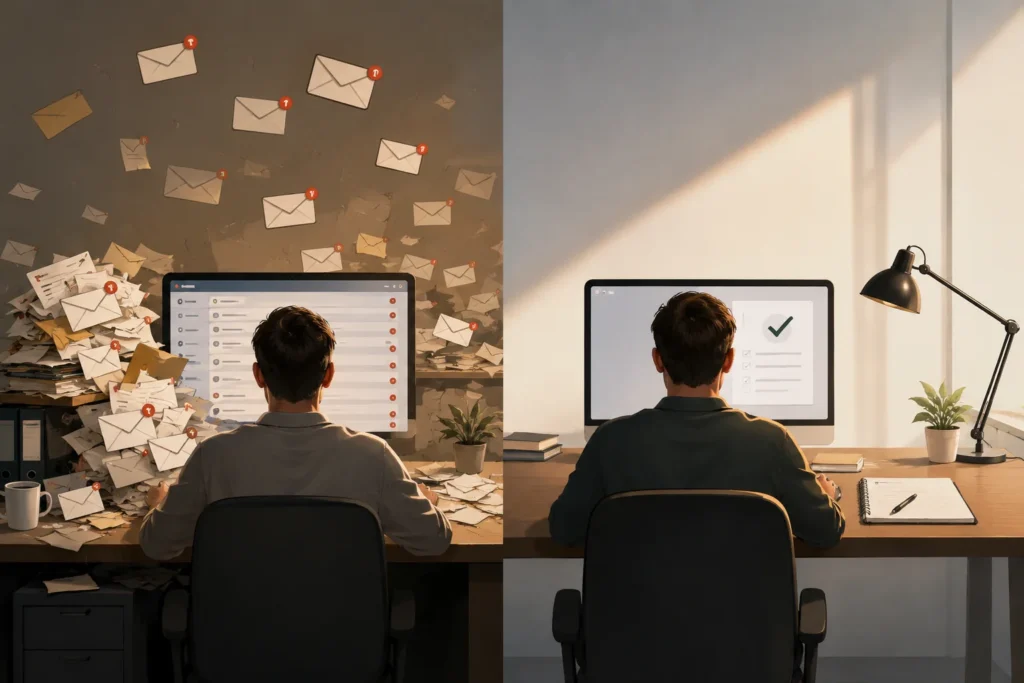
Productivity is usually measured by how much you get done. Focus is about how much attention you give to the important thing. You can be productive, in a way. Clearing forty emails, but not focused on anything that truly moves your work forward.
2. Focus vs. being busy
Busy is a feeling. Focusing is a result. A packed calendar can make you feel productive while leaving your actual priorities exactly where they were this morning. Plenty of people have made this exact observation in workplace discussions on forums like r/productivity, where “I was busy all day but got nothing done” is one of the most common complaints.
3. Deep work vs. shallow work
Computer science professor Cal Newport popularized this distinction in his book Deep Work. Deep work is cognitively demanding, distraction-free effort that produces something hard to replicate, writing a strategy document, solving a technical problem, designing something new. Shallow work is logistical: replying to messages, scheduling, status updates. You need both, but only one of them actually requires focus. The Wikipedia entry on deep work is a useful primer if you want the concept in more detail.
Why Is It So Hard to Stay Focused at Work?
Before fixing the problem, it helps to know what’s actually causing it. Most focus problems fall into one of these categories.
1. Digital notifications and messaging
Every ping pulls your attention away from what you’re doing even if you do not open the app. Your brain registers the interruption whether or not you act on it.
2. Email interruptions
An open inbox is a constant invitation to switch tasks. Most emails aren’t urgent, but they feel urgent the moment they land in front of you.
3. Multitasking and context switching
Jumping between tasks is not free. Every time you jump between tasks you pay a cost, called attention residue. Attention residue means part of your mind stays stuck on the task even after you move to the next one.
4. Meetings and workplace interruptions
A calendar full of thirty-minute meetings leaves no room for uninterrupted stretches of work. Even short meetings break up the day into pieces too small for deep work.
5. Unclear priorities
If you don’t know what matters most today, everything competes for equal attention. Vague priorities are one of the biggest, most overlooked causes of a distracted day.
6. Stress, fatigue and low energy
Focus is a finite resource. When you’re tired or stressed, your ability to concentrate drops, and small distractions become much harder to resist.
7. Cluttered physical and digital environments
A messy desk, twenty open browser tabs, and six different apps running in the background all add small amounts of friction that chip away at your attention.
How to Stay Focused at Work: 15 Proven Strategies
1. Choose your most important task

Before you open email, decide on the one task that would make today a win if you finished it. This becomes your anchor for the day, the thing every other decision gets measured against.
2. Start with a clear outcome
“Work on the report” is vague. “Draft the first three sections of the report” is not. Vague tasks invite procrastination because your brain doesn’t know where to start. A specific outcome removes that hesitation.
3. Prioritize with the Eisenhower Matrix
President Dwight D. Eisenhower is credited with the idea behind this framework, which sorts tasks by urgency and importance into four boxes: do now, schedule, delegate, or drop.
Urgent vs. important tasks
Urgent tasks demand immediate action. Important tasks move you toward real goals. The trap is spending all day on urgent-but-unimportant work, the quick emails, the small requests, while important work never gets scheduled.
Example of prioritizing a workday
Say your morning includes a client email, a strategy document due Friday, and a coworker asking for quick feedback. The strategy document is important but not urgent today, so you block time for it. The client email is both urgent and important, so it goes first. The feedback request can wait until your afternoon email window.
4. Work on one task at a time
Multitasking rarely means doing two things at the time. It means switching forth between tasks quickly. Every time you switch there’s a cost.
That cost comes in focus, slower work and more mistakes. Single-tasking might seem slower because you’re focusing on one thing. In reality it often gets the job done faster. You avoid the repeated switching tax.
You stay in the zone longer.. The work you produce is usually better. Sometimes doing one thing well beats doing things quickly.
5. Use time blocking to protect focus time
Time blocking means assigning specific tasks to specific chunks of your calendar, rather than working from an open-ended to-do list. It turns “I’ll get to it” into “I’m doing this from 9 to 10:30.”
Example time-blocked workday
Morning could be one long block for your top priority, followed by a short window for email, then a second focus block after lunch, with meetings clustered in the afternoon. The exact hours matter less than having them blocked at all.
6. Try the Pomodoro Technique
Developed by Francesco Cirillo in the late 1980s, the Pomodoro Technique breaks work into 25-minute focused sessions followed by a five-minute break. You can read more about its origin on its Wikipedia page.
When Pomodoro works best
It’s useful when a task feels overwhelming or when you’re struggling to start. Twenty-five minutes feels manageable in a way that “work on this for three hours” doesn’t.
When longer focus blocks are better
For complicated tasks like writing or coding or looking at data closely twenty-five minutes can be too quick. You use the ten minutes just getting started. In that situation a block of sixty to ninety minutes, with one planned break usually works better.
7. Eliminate digital distractions
Turn off non-essential notifications
You don’t need to know about every Slack message the second it arrives. Batch notifications or check them at set intervals instead.
Close unnecessary browser tabs
Ten open tabs are ten invitations to drift off task. Close what you’re not actively using.
Set specific email and messaging windows
Check your email at times, like 9 a.m. and 1 p.m. And 4 p.m., instead of keeping your inbox open all day. That simple change removes a source of passive interruptions.
8. Put your phone out of reach
Willpower is unreliable when the phone is sitting right next to your keyboard. Physical distance works better than self-control. Put it in a drawer or another room during your focus blocks.
9. Create a distraction-free workspace
Open-office strategy
Noise-cancelling headphones, a “do not disturb” signal, or booking a quiet room for your focus block can all help when you don’t control the layout around you.
Home-office strategy
A dedicated work area, even a small one, signals to your brain, and to anyone else in the house , that you’re in work mode.
10. Tell coworkers when you’re unavailable
Set visible “focus hours” on your calendar or status. Most teams respect this once they understand it isn’t personal, and discussions on r/WorkOnline and similar communities show this is one of the most commonly recommended fixes for constant interruptions.
11. Schedule breaks before you need them
Working nonstop doesn’t mean working better. Planned breaks prevent the kind of fatigue that leads to random phone checks and drifting attention. Schedule them rather than waiting until you’re already burned out.
12. Match difficult work to your peak energy
Most people have a window of time. In the middle of the morning. When their mind is clearer. Place your difficult task during that time instead of waiting for the afternoon when energy drops.
13. Protect your sleep, exercise and basic health habits
You can’t out-technique a lack of sleep. Consistent rest, movement, and basic health habits have a direct effect on your ability to concentrate, even if this article isn’t the place for a full health guide.
14. Batch shallow work
Group similar low-focus tasks together, email, expense reports, status updates, and handle them in one sitting instead of scattering them throughout the day between higher-value work.
15. Review your focus system and adjust it
What works one month might not work the next. Check in weekly: did your focus blocks actually happen? Were they interrupted? Adjust before the system quietly falls apart.
The Best Focus Technique Depends on the Task
| Technique | Best for | Typical use |
| Deep work | Complex projects | Writing, strategy, analysis |
| Pomodoro | Short focused sessions | Starting difficult tasks |
| Time blocking | Daily planning | Managing the whole day |
| Task batching | Repetitive work | Email, admin |
| Eisenhower Matrix | Prioritization | Deciding what matters |
None of these techniques is universally “best.” Pomodoro is great for getting unstuck. Deep work suits complex projects that need long, uninterrupted stretches. Most people end up combining two or three of these rather than picking just one.
How to Build a Focused Workday
1. Before work: choose your priorities
Spend five minutes, ideally the night before or first thing in the morning, deciding on your top one to three priorities. Doing this before opening an email keeps your inbox from setting your agenda for you.
2. First focus block: do high-value work
Protect your sharpest hours for your most important task, before meetings and messages start pulling at your attention.
3. Midday: handle communication and meetings
Cluster meetings and check messages in the middle of the day, once your priority work has had a fair shot at your best attention.
4. Afternoon: second focus block
Use a second, usually shorter, block for your next priority or to keep progressing on the first one.
5. End of day: review and prepare tomorrow
Spend five minutes reviewing what actually got done and setting tomorrow’s top priority. This closes the loop and prevents the next morning from starting in chaos.
Example 9-to-5 focused work schedule
- 9:00–9:15 — Plan the day, choose top priority
- 9:15–10:45 — Focus block 1 (highest-value task)
- 10:45–11:00 — Break
- 11:00–12:00 — Email and messages window
- 12:00–1:00 — Lunch
- 1:00–2:30 — Meetings
- 2:30–4:00 — Focus block 2
- 4:00–4:30 — Batch shallow tasks
- 4:30–5:00 — Review and plan tomorrow
This is a template, not a rule. Adjust the blocks to match your actual job and energy patterns.
How to Stay Focused in Different Work Environments
1. How to stay focused in an open office
Headphones, a visible “focus mode” signal, and booking a quiet space for your hardest work all help when the layout itself works against you.
2. How to stay focused while working from home
The challenge shifts from noisy coworkers to household distractions, chores, family, pets. A dedicated workspace and clear start/stop times help draw the line between work and home.
3. How to stay focused when working remotely with Slack or Teams
Set your status to reflect your focus blocks and mute non-urgent channels during them. Most teams adapt quickly once this becomes a normal part of how you work.
4. How to stay focused when coworkers interrupt you
A polite “I’m in a focus block until 11, can this wait?” trains people over time to respect your schedule, especially if you’re consistent about it.
5. How to stay focused during a busy meeting-heavy day
If back-to-back meetings are unavoidable, protect at least one 30-minute gap for a quick priority task, even if it’s not a full focus block.
What to Do When You Keep Getting Distracted
| Problem | Likely cause | Solution |
| Constant phone checking | Notifications or habit | Put your phone out of reach |
| Too many tasks | Poor prioritization | Choose one priority |
| Email constantly interrupts | Reactive workflow | Batch email into set windows |
| Coworkers interrupt | No visible boundaries | Set focus hours |
| Can’t start a task | Task feels vague | Define the next concrete action |
| Lose focus quickly | Fatigue or overload | Shorten your focus blocks |
| Too many meetings | Poor calendar design | Protect meeting-free blocks |
How to Measure Whether Your Focus Is Improving
Improving focus isn’t just about working longer. It’s about being able to stay on important tasks with fewer distractions and actually finish what matters. A simple weekly review can help you see whether your habits are working. The right workplace productivity tools can also support better organization, collaboration, and focus throughout the workday.
1. Track uninterrupted focus time

Keep track of how many genuine, distraction-free focus blocks you complete each week. For example, if you managed three 45-minute blocks this week compared with two last week, that’s a useful sign of progress. Don’t worry about making every session perfect. Look for gradual improvement in both the length and consistency of your focused work.
2. Count unnecessary interruptions
Pay attention to how often your work is interrupted by things that could have waited, such as checking notifications, browsing social media, or responding to non-urgent messages. You don’t need an exact count. A rough estimate is enough to identify patterns and see whether interruptions are becoming less frequent.
3. Measure priority tasks completed
At the start of the week, identify a few tasks that would make the biggest difference to your goals. Then check how many you actually completed. If your most important tasks are consistently getting pushed aside while smaller tasks fill your day, it may be a sign that your schedule or priorities need adjusting.
4. Review where your time actually goes
Take a few minutes at the end of each week to review your calendar, task list, or time-tracking data. Compare how you intended to spend your time with how you actually spent it. You may discover that meetings, email, administrative work, or unexpected requests are taking up more time than you realized.
5. Adjust your system weekly
Finish with a simple weekly focus audit. Ask yourself: What helped me focus? What distracted me? What should I change next week? Maybe you need to turn off notifications, protect your mornings for deep work, shorten meetings, or schedule more realistic focus blocks. Small adjustments made consistently are usually more effective than completely changing your productivity system every few weeks.
Productivity Tools That Can Help You Stay Focused
Tools should support your focus system, not replace it. No app fixes unclear priorities or an overloaded calendar on its own. For more ideas, explore our guide to the best productivity tools for managing tasks, time, focus, and daily workflows.
1. Calendar and time-blocking tools
Google Calendar and Outlook both work fine for time blocking, the tool matters far less than actually using it.
2. Task-management tools
Todoist, Notion, Trello, and Asana all help you track priorities, though a plain notebook works just as well if that’s what you’ll actually use.
3. Website and distraction blockers
Apps like Freedom or browser-based site blockers can help during focus blocks if self-control alone isn’t cutting it.
4. Focus and meditation apps
Headspace and Calm can support the underlying stress and fatigue issues that make focus harder in the first place.
5. Time-tracking tools
RescueTime and similar tools show you where your time actually goes, which is often more revealing than people expect.
Common Focus Mistakes to Avoid
Even with good intentions, certain habits can quietly make it harder to concentrate. Recognizing these mistakes can help you build a focus system that is realistic and sustainable.
1. Trying to multitask
Multitasking can feel productive because you’re handling several things at once. In reality, your attention is often jumping between tasks, which increases the mental cost of switching and makes it easier to lose your place. Whenever possible, focus on one important task at a time and finish a meaningful portion before moving to something else.
2. Keeping notifications permanently enabled
Every notification creates a small interruption, even if you don’t immediately respond to it. A message, email alert, or social media notification can pull your attention away from the task you’re doing. Turn off non-essential notifications and check messages at specific times instead of letting them control your attention throughout the day.
3. Filling every minute with meetings
A calendar packed from morning to evening may look efficient, but it leaves little room for uninterrupted work. Important tasks often need more than a few spare minutes between meetings. Protect some open blocks in your calendar for focused work, planning, and catching up.
4. Working without priorities
When everything is treated as important, it’s difficult to know what deserves your attention first. Start your day or work session by identifying the one or two tasks that matter most. This gives you a clear direction and makes it easier to avoid spending your best energy on low-value work.
5. Skipping breaks
Breaks aren’t a reward you earn after finishing all your work. They’re part of maintaining concentration over a long day. Getting up, walking around, stretching, or simply stepping away from your screen for a few minutes can help you return with more energy and attention.
6. Using too many productivity apps
Adding another productivity app doesn’t automatically make you more organized. If you have separate tools for tasks, notes, calendars, time tracking, communication, and reminders, managing the tools themselves can become a distraction. Start with the smallest set of tools that solves your actual problems and use them consistently.
7. Trying to copy someone else’s routine exactly
A routine that works perfectly for another person may not fit your job, energy levels, responsibilities, or work environment. Instead of copying someone’s schedule hour by hour, identify the principle behind it. Borrow useful ideas, then adapt them to when you naturally have the most energy and when your work requires the most concentration.
Frequently Asked Questions
How can I stay focused at work all day?
Choose one priority in the morning, protect at least one distraction-free block for it, batch your shallow tasks, and take planned breaks instead of pushing through fatigue.
Why can’t I concentrate at work?
Usually some combination of notifications, unclear priorities, meeting overload, and fatigue. Identify which one is dominant for you before trying to fix all of them at once.
What is the best focus technique for work?
There isn’t one universal answer. Pomodoro suits short bursts and hard-to-start tasks; time blocking suits planning a full day; deep work suits complex, high-value projects.
Is Pomodoro better than time blocking?
They solve different problems. Pomodoro structures a single work session; time blocking structures your whole day. Many people use both together.
How do I focus when working from home?
Set a dedicated workspace, keep consistent start and stop times, and communicate your focus hours clearly to anyone else in the house.
Conclusion
Staying focused at work isn’t about trying. It’s about building a day where fewer things fight for your attention in the place. Start by sorting your work. Decide what truly matters and focus on that first.
Then take control of the distractions you can actually change, turn off notifications, close tabs and put your phone in another room. Protect your time by setting aside blocks for deep work. Don’t let interruptions sneak in. Take breaks intentionally. Step away from your desk, move your body, clear your head.
Don’t just push through. At the end of each week take a few minutes to look back. Ask what worked, what didn’t and what you can do differently. None of these actions is hard by itself.. The real change happens when you do all of them. Not once. Not, as a one-time fix. Every single day, together. That’s how focus becomes natural.

Mehreen Mushtaq is a skilled content writer dedicated to creating high-quality, engaging, and SEO-focused blogs. She specializes in strategic keyword usage, search intent, and informative content that connects with readers while helping websites strengthen their visibility and rankings in search results.